<?xml version="1.0" encoding="utf-8"?><feed xmlns="http://www.w3.org/2005/Atom" ><generator uri="https://jekyllrb.com/" version="3.10.0">Jekyll</generator><link href="https://czhou578.github.io/blog/feed.xml" rel="self" type="application/atom+xml" /><link href="https://czhou578.github.io/blog/" rel="alternate" type="text/html" /><updated>2026-05-10T21:17:17+00:00</updated><id>https://czhou578.github.io/blog/feed.xml</id><title type="html">Colin Zhou blog</title><subtitle>I write and muse about various topics as a software engineer in the Bay Area.</subtitle><entry><title type="html">How I use AI Agents for coding in 2026</title><link href="https://czhou578.github.io/blog/2026/04/18/how-i-use-agents.html" rel="alternate" type="text/html" title="How I use AI Agents for coding in 2026" /><published>2026-04-18T00:00:00+00:00</published><updated>2026-04-18T00:00:00+00:00</updated><id>https://czhou578.github.io/blog/2026/04/18/how-i-use-agents</id><content type="html" xml:base="https://czhou578.github.io/blog/2026/04/18/how-i-use-agents.html"><![CDATA[<p><img src="https://czhou578.github.io/blog/images/ai-ide.png" alt="alt text" /></p>

<p>Agentic workflows are slowly becoming the norm for software development. My current company generously provides all developers with a subscription to Google AI Ultra, which gives you access to the Antigravity IDE with no rate limits, and the maximum priority for requests.</p>

<p>Previously, when I was still using GitHub Copilot in VSCode, my AI workflow mainly revolved around adding files and terminal selections into context, typing in a query, waiting for a response, and then manually applying the changes / asking for clarifications.</p>

<p>I rarely found myself turning on agent mode since I wanted to maintain maximum control over what was accepted and what wasn’t. In a way, I thought that accepting agents into my mainstream coding would be like trying to defuse a landmine every time I tried to move forward.</p>

<p>But Antigravity agents on net balance have been <strong>very helpful</strong>.</p>

<p>Through the use of Claude and Gemini, I’ve realized that a large number of bugs that I encounter can be fixed relatively easily with a few targeted prompts, sometimes with only one prompt. As a full stack developer, I have been able to quickly implement UI designs (basically not writing Tailwind CSS at all anymore) and also plan out the architecture of new features.</p>

<p>Even better, if I am not confident of it doing a large code change, I can always ask the agent to break it down into smaller steps, and I can review each step individually, or generate a plan that I can comment on before letting it go. You don’t even necessarily need to link every single file of interest in its context; the smarter models can figure that out by themselves.</p>

<hr />

<p>Here are a few things that agents are good at doing, through my experience:</p>

<p><strong>1. Generating architecture deep-dives</strong></p>

<p>This one is probably the most useful of them all. I can add several files to context and ask Claude or Gemini to give me a first principles explanation of the code from any file, and tell me how it works together and the overall data flow. I’ve been able to quickly use this to refresh my memory on code that I haven’t touched for a long time, or explore new repositories.</p>

<p>The GitHub website has an Agents tab that you can use to ask an agent about a codebase. I have used this feature many times to understand the codebase of open source projects I’m interested in contributing to, and even the codebases of other projects at work.</p>

<p>I truly think there is no more excuse for any developer to not be able to understand any codebase, no matter how large or complex it is, now that you can have AI explain it to you.</p>

<p><strong>2. Adding logging to existing code</strong></p>

<p>This is a task that I used to dread. I would have to go through the codebase and add logging statements to the code, and then I would have to test the code to make sure that the logging was working correctly. But with AI, if you are able to narrow down the area of concern, you can ask the LLM to add targeted logging to identify issues.</p>

<p>It can go overboard with the emojis, but I have found that the emojis actually help me more quickly identify the data flow and errors in large log files with tens of thousands of lines.</p>

<p><strong>3. Doing UI work</strong></p>

<p>I barely write my own CSS anymore. I can just describe what I want in plain English, and Claude / Gemini will generate the Tailwind CSS code for me. In terms of design, I can ask Gemini to come up with possible UI designs that fit specific criteria, and have it implement that automatically.</p>

<p>My background is not in design, and I am going off of gut instinct when it comes to the design portion, but I think even designers working with LLM’s can produce a lot more wireframes that are plausible then otherwise. Gemini does seem to be better at UI then the other LLM’s for some reason.</p>

<p>I find myself being more concerned with how the frontend logic works rather then the designs themselves, which for me is very refreshing.</p>

<p><strong>4. Refactoring monolithic components</strong></p>

<p>For one of my projects, I had a manager component in the backend that was responsible for handling websocket connections from the frontend, sending video, and audio chunks to a pipeline and a separate microservice, and handling all the responses. It was hard to reason about, and I was honestly dreading refactoring it.</p>

<p>I asked Claude to simply refactor this component into multiple components, while keeping the code simple &amp; functional. It proceeded to give me a plan for refactoring into two components, that would each be responsible for only a part of the original component. It ended up doing that completely correctly on the first try.</p>

<p>I stressed over testing the system for a while, but it ended up working out perfectly to specification. Unbelievable.</p>

<p><strong>5. Doing DevOps work</strong></p>

<p>When I wanted to dockerize one of my projects, I had to create dockerfiles and a docker-compose file. With the complexity revolving around using multiple AI models, and also making sure the final setup was easy to use for a developer, I was facing a big uphill climb.</p>

<p>Thankfully, I was able to ask Gemini to give me dockerfiles for all the services, and the compose file. It was able to save all the model weights to a local volume so that in development, we wouldn’t have to download the model weights every time we wanted to run the system. It saved so much time and greatly improved the developer experience, not to mention enhancing the ease of deployment to prod.</p>

<p><strong>6. Doing security audits and identifying performance optimizations</strong></p>

<p>I was able to ask Claude Opus 4.6 to generate a comprehensive security audit of my codebases, and it was able to identify several vulnerabilities that I was not aware of. It also gave me suggestions on how to fix them, and I was able to take that advice effectively. I think that for a general purpose scan, it is useful.</p>

<p>But be aware that sometimes it will highlight changes that it deems extremely urgent, but in reality are not that big of a deal with the scope of the project. That requires human judgement and good aptitude to distinguish.</p>

<hr />

<p>Now on the negative side:</p>

<p><strong>1. Bad Frontend Habits</strong></p>

<p>On the frontend, it is much easier for agents to keep adding states and ref’s in React, which can easily accumulate and become hard to reason about. It seems to be the default behavior for agents to do this, and needs a lot of human supervision.</p>

<p>Cleanups have been relatively easy for me, but in the early stages, it’s definitely a hit and miss.</p>

<p><strong>2. Changing Models in the Middle of a Conversation</strong></p>

<p>Changing models in the middle of a conversation can lead to a loss of context, and reconciling different arguments can be difficult. If Claude suggested one change, but then Gemini reversed it, it is hard to tell which one is correct, and even more difficult to reverse.</p>

<p>Besides trivial errors, it really is a hope and prayer that Claude and Gemini are on the same page. It is important to prioritise diversity of thought, but sometimes a consensus between models is neede for productivity.</p>

<p><strong>3. Unnecessary File Creation</strong></p>

<p>In addition, agents have a habit of creating files that are not needed on occasions. You have to be very clear and explicit about which files to add. More often then not for testing purposes, it will just create a new script to test something, and then not delete it.</p>

<p>I’ve found that agents cannot actually deal with Jupyter Notebooks effectively for some reason. They will often make syntax errors when editing code cells, and sometimes just create a Python script to run the code instead. I don’t know if I’m missing something here.</p>

<p><strong>4. Terminal Management</strong></p>

<p>While I do appreciate agents spinning up a terminal and running commands to test their changes, it can be very annoying to have to keep track of the terminals that have spawned. I often times have existing terminals in play, and conflicts in this sense can be hard to manage.</p>

<p><strong>5. UI when creating plans</strong></p>

<p>This is definitely nitpicking at this point but when I ask Gemini to generate a plan for example, in Antigravity IDE, it creates a document that is not formatted correctly, and seems very wonky. In comparison, Claude’s plan actually looks like a real Markdown preview that you can see on GitHub repos, and not some notepad-quality document.</p>

<hr />

<p>While a lot of people have been playing around with <code class="language-plaintext highlighter-rouge">AGENT.md</code> files and massive configurations for agentic workspaces, I still have not felt the need to do so. Agents have a context and I don’t want to pollute their memories. I can see where this can be useful for certain cases like formatting code, and maybe it can do it automatically in the style of ruff in Python, or prettier in JavaScript. But is that really worth it when running a script that formats both frontend and backend can be done in a few seconds?</p>

<p>All in all, the improvement in agentic coding over the past few months has been real, and I’m excited to see what the future in agentic coding holds.</p>

<p>I’ve often compared agentic coding to defusing planted bombs in a minefield. Do a bad job, and the mine can explode in your face, creating a big fat mess. But the size of the mines are definitely shrinking, and we should be excited about that.</p>

<p>CZ</p>]]></content><author><name></name></author><summary type="html"><![CDATA[]]></summary></entry><entry><title type="html">Adding KV Cache to NanoGPT</title><link href="https://czhou578.github.io/blog/2026/04/18/adding-kv-cache-to-nanogpt.html" rel="alternate" type="text/html" title="Adding KV Cache to NanoGPT" /><published>2026-04-18T00:00:00+00:00</published><updated>2026-04-18T00:00:00+00:00</updated><id>https://czhou578.github.io/blog/2026/04/18/adding-kv-cache-to-nanogpt</id><content type="html" xml:base="https://czhou578.github.io/blog/2026/04/18/adding-kv-cache-to-nanogpt.html"><![CDATA[<p>NanoGPT is Andrej Karpathy’s <a href="https://github.com/karpathy/nanoGPT">from-scratch GPT</a> trained on Shakespeare — no abstractions, no optimizations, just the bare-minimum transformer you need to generate text. I wanted to understand how inference servers actually work, so I started at the bottom: adding a KV cache to this toy model by hand.</p>

<p>The core idea is simple. In a standard transformer, every time you generate a new token, you recompute the key and value projections for <em>every</em> token in the sequence — including all the ones you already processed. That’s quadratic in the sequence length. A KV cache stores the key and value vectors from previous positions so you never recompute them. The query for the new token attends over the cached keys and values, and you only compute K and V for the single new token. This brings the per-step cost from O(n) to O(1), and the total generation cost from O(n²) to O(n).</p>

<h2 id="where-the-cache-lives">Where the cache lives</h2>

<p>The natural place for the cache is inside the <code class="language-plaintext highlighter-rouge">Head</code> class — the module that handles one head of self-attention. Each head independently projects the input into query, key, and value vectors, so each head needs its own cache.</p>

<p>I had to think through several things:</p>

<ul>
  <li><strong>Data structure.</strong> My first instinct was a hashmap keyed by token ID, but that’s wrong — the cache isn’t about <em>which</em> token, it’s about <em>which position</em>. It’s just a tensor of shape <code class="language-plaintext highlighter-rouge">(B, T, hs)</code> that grows by one row each decode step as we concatenate new key/value vectors along the sequence dimension.</li>
  <li><strong>Don’t interleave K and V.</strong> You might think about storing keys and values in one tensor, but the whole point of caching is fast access. During attention, you need <code class="language-plaintext highlighter-rouge">Q @ K^T</code> and then <code class="language-plaintext highlighter-rouge">weights @ V</code> — interleaving would force you to extract K and V back out every step, defeating the purpose.</li>
  <li><strong>Masking goes away.</strong> In the original NanoGPT, the causal mask prevents the model from attending to future tokens during training. But during cached inference, we feed one token at a time. There are no future tokens to mask — the cache only contains past positions. So the mask can be removed entirely for the inference path.</li>
  <li><strong>Training vs. inference.</strong> PyTorch’s <code class="language-plaintext highlighter-rouge">nn.Module</code> has a <code class="language-plaintext highlighter-rouge">self.training</code> flag that flips when you call <code class="language-plaintext highlighter-rouge">model.eval()</code>. We use this to guard the cache logic: during training, the original full-sequence attention runs unchanged; during inference, we accumulate into the cache and attend over it.</li>
</ul>

<p>The final code:</p>

<div class="language-python highlighter-rouge"><div class="highlight"><pre class="highlight"><code>
<span class="k">class</span> <span class="nc">Head</span><span class="p">(</span><span class="n">nn</span><span class="p">.</span><span class="n">Module</span><span class="p">):</span>
    <span class="s">""" one head of self-attention """</span>

    <span class="k">def</span> <span class="nf">__init__</span><span class="p">(</span><span class="bp">self</span><span class="p">,</span> <span class="n">head_size</span><span class="p">):</span>
        <span class="nb">super</span><span class="p">().</span><span class="n">__init__</span><span class="p">()</span>
        <span class="bp">self</span><span class="p">.</span><span class="n">key</span> <span class="o">=</span> <span class="n">nn</span><span class="p">.</span><span class="n">Linear</span><span class="p">(</span><span class="n">n_embd</span><span class="p">,</span> <span class="n">head_size</span><span class="p">,</span> <span class="n">bias</span><span class="o">=</span><span class="bp">False</span><span class="p">)</span>
        <span class="bp">self</span><span class="p">.</span><span class="n">query</span> <span class="o">=</span> <span class="n">nn</span><span class="p">.</span><span class="n">Linear</span><span class="p">(</span><span class="n">n_embd</span><span class="p">,</span> <span class="n">head_size</span><span class="p">,</span> <span class="n">bias</span><span class="o">=</span><span class="bp">False</span><span class="p">)</span>
        <span class="bp">self</span><span class="p">.</span><span class="n">value</span> <span class="o">=</span> <span class="n">nn</span><span class="p">.</span><span class="n">Linear</span><span class="p">(</span><span class="n">n_embd</span><span class="p">,</span> <span class="n">head_size</span><span class="p">,</span> <span class="n">bias</span><span class="o">=</span><span class="bp">False</span><span class="p">)</span>
        <span class="bp">self</span><span class="p">.</span><span class="n">register_buffer</span><span class="p">(</span><span class="s">'tril'</span><span class="p">,</span> <span class="n">torch</span><span class="p">.</span><span class="n">tril</span><span class="p">(</span><span class="n">torch</span><span class="p">.</span><span class="n">ones</span><span class="p">(</span><span class="n">block_size</span><span class="p">,</span> <span class="n">block_size</span><span class="p">)))</span>
        <span class="bp">self</span><span class="p">.</span><span class="n">key_cache</span> <span class="o">=</span> <span class="bp">None</span>
        <span class="bp">self</span><span class="p">.</span><span class="n">value_cache</span> <span class="o">=</span> <span class="bp">None</span>
        <span class="bp">self</span><span class="p">.</span><span class="n">dropout</span> <span class="o">=</span> <span class="n">nn</span><span class="p">.</span><span class="n">Dropout</span><span class="p">(</span><span class="n">dropout</span><span class="p">)</span>

    <span class="c1"># KV Cache lives here.
</span>    <span class="k">def</span> <span class="nf">forward</span><span class="p">(</span><span class="bp">self</span><span class="p">,</span> <span class="n">x</span><span class="p">):</span>
        <span class="c1"># input of size (batch, time-step, channels)
</span>        <span class="c1"># output of size (batch, time-step, head size)
</span>        <span class="n">B</span><span class="p">,</span><span class="n">T</span><span class="p">,</span><span class="n">C</span> <span class="o">=</span> <span class="n">x</span><span class="p">.</span><span class="n">shape</span>
        <span class="n">k</span> <span class="o">=</span> <span class="bp">self</span><span class="p">.</span><span class="n">key</span><span class="p">(</span><span class="n">x</span><span class="p">)</span>   <span class="c1"># (B,1,hs)
</span>        <span class="n">q</span> <span class="o">=</span> <span class="bp">self</span><span class="p">.</span><span class="n">query</span><span class="p">(</span><span class="n">x</span><span class="p">)</span> <span class="c1"># (B,1,hs)
</span>        <span class="n">v</span> <span class="o">=</span> <span class="bp">self</span><span class="p">.</span><span class="n">value</span><span class="p">(</span><span class="n">x</span><span class="p">)</span>

        <span class="k">if</span> <span class="ow">not</span> <span class="bp">self</span><span class="p">.</span><span class="n">training</span><span class="p">:</span>
            <span class="k">if</span> <span class="bp">self</span><span class="p">.</span><span class="n">key_cache</span> <span class="ow">is</span> <span class="ow">not</span> <span class="bp">None</span><span class="p">:</span>
                <span class="bp">self</span><span class="p">.</span><span class="n">key_cache</span> <span class="o">=</span> <span class="n">torch</span><span class="p">.</span><span class="n">cat</span><span class="p">([</span><span class="bp">self</span><span class="p">.</span><span class="n">key_cache</span><span class="p">,</span> <span class="n">k</span><span class="p">],</span> <span class="n">dim</span><span class="o">=-</span><span class="mi">2</span><span class="p">)</span> <span class="c1"># (B, num_tokens_seen, hs)
</span>                <span class="bp">self</span><span class="p">.</span><span class="n">value_cache</span> <span class="o">=</span> <span class="n">torch</span><span class="p">.</span><span class="n">cat</span><span class="p">([</span><span class="bp">self</span><span class="p">.</span><span class="n">value_cache</span><span class="p">,</span> <span class="n">v</span><span class="p">],</span> <span class="n">dim</span><span class="o">=-</span><span class="mi">2</span><span class="p">)</span> <span class="c1"># (B, num_tokens_seen, hs)
</span>            <span class="k">else</span><span class="p">:</span>
                <span class="bp">self</span><span class="p">.</span><span class="n">key_cache</span> <span class="o">=</span> <span class="n">k</span>
                <span class="bp">self</span><span class="p">.</span><span class="n">value_cache</span> <span class="o">=</span> <span class="n">v</span>

            <span class="n">wei</span> <span class="o">=</span> <span class="n">q</span> <span class="o">@</span> <span class="n">torch</span><span class="p">.</span><span class="n">transpose</span><span class="p">(</span><span class="bp">self</span><span class="p">.</span><span class="n">key_cache</span><span class="p">,</span> <span class="mi">1</span><span class="p">,</span> <span class="mi">2</span><span class="p">)</span> <span class="o">*</span> <span class="bp">self</span><span class="p">.</span><span class="n">key_cache</span><span class="p">.</span><span class="n">shape</span><span class="p">[</span><span class="o">-</span><span class="mi">1</span><span class="p">]</span><span class="o">**-</span><span class="mf">0.5</span>

            <span class="n">wei</span> <span class="o">=</span> <span class="n">F</span><span class="p">.</span><span class="n">softmax</span><span class="p">(</span><span class="n">wei</span><span class="p">,</span> <span class="n">dim</span><span class="o">=-</span><span class="mi">1</span><span class="p">)</span> <span class="c1"># (B, T, T)
</span>            <span class="n">wei</span> <span class="o">=</span> <span class="bp">self</span><span class="p">.</span><span class="n">dropout</span><span class="p">(</span><span class="n">wei</span><span class="p">)</span>
            <span class="c1"># perform the weighted aggregation of the values
</span>            <span class="n">out</span> <span class="o">=</span> <span class="n">wei</span> <span class="o">@</span> <span class="bp">self</span><span class="p">.</span><span class="n">value_cache</span> <span class="c1"># (B, 1, T) @ (B, T, hs) -&gt; (B, 1, hs)
</span>            <span class="k">return</span> <span class="n">out</span>
        <span class="k">else</span><span class="p">:</span>
            <span class="c1"># compute attention scores ("affinities")
</span>            <span class="n">wei</span> <span class="o">=</span> <span class="n">q</span> <span class="o">@</span> <span class="n">k</span><span class="p">.</span><span class="n">transpose</span><span class="p">(</span><span class="o">-</span><span class="mi">2</span><span class="p">,</span><span class="o">-</span><span class="mi">1</span><span class="p">)</span> <span class="o">*</span> <span class="n">k</span><span class="p">.</span><span class="n">shape</span><span class="p">[</span><span class="o">-</span><span class="mi">1</span><span class="p">]</span><span class="o">**-</span><span class="mf">0.5</span> <span class="c1"># (B, T, hs) @ (B, hs, T) -&gt; (B, T, T)
</span>            <span class="n">wei</span> <span class="o">=</span> <span class="n">wei</span><span class="p">.</span><span class="n">masked_fill</span><span class="p">(</span><span class="bp">self</span><span class="p">.</span><span class="n">tril</span><span class="p">[:</span><span class="n">T</span><span class="p">,</span> <span class="p">:</span><span class="n">T</span><span class="p">]</span> <span class="o">==</span> <span class="mi">0</span><span class="p">,</span> <span class="nb">float</span><span class="p">(</span><span class="s">'-inf'</span><span class="p">))</span> <span class="c1"># (B, T, T)
</span>            <span class="n">wei</span> <span class="o">=</span> <span class="n">F</span><span class="p">.</span><span class="n">softmax</span><span class="p">(</span><span class="n">wei</span><span class="p">,</span> <span class="n">dim</span><span class="o">=-</span><span class="mi">1</span><span class="p">)</span> <span class="c1"># (B, T, T)
</span>            <span class="n">wei</span> <span class="o">=</span> <span class="bp">self</span><span class="p">.</span><span class="n">dropout</span><span class="p">(</span><span class="n">wei</span><span class="p">)</span>
            <span class="c1"># perform the weighted aggregation of the 
</span>            
            <span class="n">out</span> <span class="o">=</span> <span class="n">wei</span> <span class="o">@</span> <span class="n">v</span> <span class="c1"># (B, T, T) @ (B, T, hs) -&gt; (B, T, hs)
</span>            <span class="k">return</span> <span class="n">out</span>  

</code></pre></div></div>

<p>The inference branch is the interesting one. When a new token arrives, we project it to get <code class="language-plaintext highlighter-rouge">k</code> and <code class="language-plaintext highlighter-rouge">v</code> of shape <code class="language-plaintext highlighter-rouge">(B, 1, hs)</code> and concatenate them onto the existing cache. Now the cache has shape <code class="language-plaintext highlighter-rouge">(B, T_so_far, hs)</code>. The query — also <code class="language-plaintext highlighter-rouge">(B, 1, hs)</code> — attends over the full cache: <code class="language-plaintext highlighter-rouge">Q @ K^T</code> gives <code class="language-plaintext highlighter-rouge">(B, 1, T_so_far)</code> attention weights, and the weighted sum over V gives <code class="language-plaintext highlighter-rouge">(B, 1, hs)</code>. One row in, one row out. The training branch is unchanged — full-sequence attention with the causal mask, exactly as Karpathy wrote it.</p>

<p>The <code class="language-plaintext highlighter-rouge">if self.key_cache is not None</code> check handles the first step: when the cache is empty (the very first forward pass), we initialize it directly instead of trying to concatenate onto <code class="language-plaintext highlighter-rouge">None</code>.</p>

<h2 id="generation">Generation</h2>

<p>With the cache in place, we need a generation function that actually uses it:</p>

<div class="language-python highlighter-rouge"><div class="highlight"><pre class="highlight"><code><span class="k">def</span> <span class="nf">generate_kv_cache</span><span class="p">(</span><span class="n">model</span><span class="p">,</span> <span class="n">idx</span><span class="p">,</span> <span class="n">max_num_tokens</span><span class="p">):</span>
    <span class="n">model</span><span class="p">.</span><span class="nb">eval</span><span class="p">()</span>
    <span class="n">clear_kv_cache</span><span class="p">(</span><span class="n">model</span><span class="p">)</span>

    <span class="n">model</span><span class="p">(</span><span class="n">idx</span><span class="p">)</span>

    <span class="k">with</span> <span class="n">torch</span><span class="p">.</span><span class="n">no_grad</span><span class="p">():</span>
        <span class="k">for</span> <span class="n">step</span> <span class="ow">in</span> <span class="nb">range</span><span class="p">(</span><span class="n">max_num_tokens</span><span class="p">):</span>
            <span class="n">curr_pos</span> <span class="o">=</span> <span class="n">idx</span><span class="p">.</span><span class="n">shape</span><span class="p">[</span><span class="mi">1</span><span class="p">]</span>

            <span class="n">logits</span><span class="p">,</span> <span class="n">_</span> <span class="o">=</span> <span class="n">model</span><span class="p">(</span><span class="n">idx</span><span class="p">[:,</span> <span class="o">-</span><span class="mi">1</span><span class="p">:],</span> <span class="n">pos</span><span class="o">=</span><span class="n">torch</span><span class="p">.</span><span class="n">tensor</span><span class="p">[</span><span class="n">curr_pos</span><span class="p">],</span> <span class="n">device</span><span class="o">=</span><span class="n">device</span><span class="p">)</span> <span class="c1"># (B, 1, C)
</span>            <span class="n">logits</span> <span class="o">=</span> <span class="n">logits</span><span class="p">[:,</span> <span class="o">-</span><span class="mi">1</span><span class="p">,</span> <span class="p">:]</span>
            
            <span class="c1"># apply softmax to get probabilities
</span>            <span class="n">probs</span> <span class="o">=</span> <span class="n">F</span><span class="p">.</span><span class="n">softmax</span><span class="p">(</span><span class="n">logits</span><span class="p">,</span> <span class="n">dim</span><span class="o">=-</span><span class="mi">1</span><span class="p">)</span> <span class="c1"># (B, C)
</span>            <span class="c1"># sample from the distribution
</span>            <span class="n">idx_next</span> <span class="o">=</span> <span class="n">torch</span><span class="p">.</span><span class="n">multinomial</span><span class="p">(</span><span class="n">probs</span><span class="p">,</span> <span class="n">num_samples</span><span class="o">=</span><span class="mi">1</span><span class="p">)</span> <span class="c1"># (B, 1)
</span>            <span class="c1"># append sampled index to the running sequence
</span>            <span class="n">idx</span> <span class="o">=</span> <span class="n">torch</span><span class="p">.</span><span class="n">cat</span><span class="p">((</span><span class="n">idx</span><span class="p">,</span> <span class="n">idx_next</span><span class="p">),</span> <span class="n">dim</span><span class="o">=</span><span class="mi">1</span><span class="p">)</span> <span class="c1"># (B, T+1)
</span>    
    <span class="k">return</span> <span class="n">idx</span>

<span class="n">model</span> <span class="o">=</span> <span class="n">GPTLanguageModel</span><span class="p">()</span>
<span class="n">m</span> <span class="o">=</span> <span class="n">model</span><span class="p">.</span><span class="n">to</span><span class="p">(</span><span class="n">device</span><span class="p">)</span>
<span class="c1"># print the number of parameters in the model
</span><span class="k">print</span><span class="p">(</span><span class="nb">sum</span><span class="p">(</span><span class="n">p</span><span class="p">.</span><span class="n">numel</span><span class="p">()</span> <span class="k">for</span> <span class="n">p</span> <span class="ow">in</span> <span class="n">m</span><span class="p">.</span><span class="n">parameters</span><span class="p">())</span><span class="o">/</span><span class="mf">1e6</span><span class="p">,</span> <span class="s">'M parameters'</span><span class="p">)</span>

<span class="c1"># create a PyTorch optimizer
</span><span class="n">optimizer</span> <span class="o">=</span> <span class="n">torch</span><span class="p">.</span><span class="n">optim</span><span class="p">.</span><span class="n">AdamW</span><span class="p">(</span><span class="n">model</span><span class="p">.</span><span class="n">parameters</span><span class="p">(),</span> <span class="n">lr</span><span class="o">=</span><span class="n">learning_rate</span><span class="p">)</span>

<span class="k">for</span> <span class="nb">iter</span> <span class="ow">in</span> <span class="nb">range</span><span class="p">(</span><span class="n">max_iters</span><span class="p">):</span>

    <span class="c1"># every once in a while evaluate the loss on train and val sets
</span>    <span class="k">if</span> <span class="nb">iter</span> <span class="o">%</span> <span class="n">eval_interval</span> <span class="o">==</span> <span class="mi">0</span> <span class="ow">or</span> <span class="nb">iter</span> <span class="o">==</span> <span class="n">max_iters</span> <span class="o">-</span> <span class="mi">1</span><span class="p">:</span>
        <span class="n">losses</span> <span class="o">=</span> <span class="n">estimate_loss</span><span class="p">()</span>
        <span class="k">print</span><span class="p">(</span><span class="sa">f</span><span class="s">"step </span><span class="si">{</span><span class="nb">iter</span><span class="si">}</span><span class="s">: train loss </span><span class="si">{</span><span class="n">losses</span><span class="p">[</span><span class="s">'train'</span><span class="p">]</span><span class="si">:</span><span class="p">.</span><span class="mi">4</span><span class="n">f</span><span class="si">}</span><span class="s">, val loss </span><span class="si">{</span><span class="n">losses</span><span class="p">[</span><span class="s">'val'</span><span class="p">]</span><span class="si">:</span><span class="p">.</span><span class="mi">4</span><span class="n">f</span><span class="si">}</span><span class="s">"</span><span class="p">)</span>

    <span class="c1"># sample a batch of data
</span>    <span class="n">xb</span><span class="p">,</span> <span class="n">yb</span> <span class="o">=</span> <span class="n">get_batch</span><span class="p">(</span><span class="s">'train'</span><span class="p">)</span>

    <span class="c1"># evaluate the loss
</span>    <span class="n">logits</span><span class="p">,</span> <span class="n">loss</span> <span class="o">=</span> <span class="n">model</span><span class="p">(</span><span class="n">xb</span><span class="p">,</span> <span class="n">yb</span><span class="p">)</span>
    <span class="n">optimizer</span><span class="p">.</span><span class="n">zero_grad</span><span class="p">(</span><span class="n">set_to_none</span><span class="o">=</span><span class="bp">True</span><span class="p">)</span>
    <span class="n">loss</span><span class="p">.</span><span class="n">backward</span><span class="p">()</span>
    <span class="n">optimizer</span><span class="p">.</span><span class="n">step</span><span class="p">()</span>

<span class="c1"># generate from the model
</span><span class="n">context</span> <span class="o">=</span> <span class="n">torch</span><span class="p">.</span><span class="n">zeros</span><span class="p">((</span><span class="mi">1</span><span class="p">,</span> <span class="mi">1</span><span class="p">),</span> <span class="n">dtype</span><span class="o">=</span><span class="n">torch</span><span class="p">.</span><span class="nb">long</span><span class="p">,</span> <span class="n">device</span><span class="o">=</span><span class="n">device</span><span class="p">)</span>
<span class="k">print</span><span class="p">(</span><span class="n">decode</span><span class="p">(</span><span class="n">generate_kv_cache</span><span class="p">(</span><span class="n">m</span><span class="p">,</span> <span class="n">context</span><span class="p">,</span> <span class="n">max_num_tokens</span><span class="o">=</span><span class="mi">500</span><span class="p">)[</span><span class="mi">0</span><span class="p">].</span><span class="n">tolist</span><span class="p">()))</span>


</code></pre></div></div>
<p>In this function, we are setting the model to evaluation mode, and making sure to clear the kv cache for the model.</p>

<p>Now, we run <code class="language-plaintext highlighter-rouge">model(idx)</code> once since that is how we prefill the KV cache before the next token is generated. Then, we have a for loop that iterates until the max number of new tokens we want, and grab the logits for the specific index, run softmax over the logits to get the probabilities, and then sample the next index. The index is added to the running sequence of indexes, which will then be decoded into the correct letters at the final step.</p>

<h2 id="positional-encoding">Positional encoding</h2>

<p>There’s a subtlety here that tripped me up. A transformer has no inherent sense of order — “A cat is big” and “A big is cat” would produce the same embeddings without position information. NanoGPT uses a learned position embedding table: during the forward pass, the position index looks up a vector from the table, and that vector gets added to the token embedding.</p>

<p>During full-sequence training, this is straightforward: if the sequence has 17 tokens, you look up positions 0 through 16. But with the KV cache, we’re feeding one token at a time. If we don’t pass the correct position, the model treats every token as position 0.</p>

<p>The fix is simple: <code class="language-plaintext highlighter-rouge">curr_pos = idx.shape[1]</code>, which is the current length of the full sequence (prompt + generated so far). Here’s a concrete example:</p>

<div class="language-plaintext highlighter-rouge"><div class="highlight"><pre class="highlight"><code>Prompt: "O Romeo, " → encodes to 9 tokens: [15, 23, 6, 18, 14, 5, 12, 0, 3]

idx = [[15, 23, 6, 18, 14, 5, 12, 0, 3]]   # shape (1, 9)
       ↑   ↑   ↑   ↑   ↑   ↑   ↑  ↑  ↑
      pos0 pos1 ... ... ... ... ... ... pos8

Step 0: width is 9 → model uses pos 9 → generates token 42 → append
idx = [[15, 23, 6, 18, 14, 5, 12, 0, 3, 42]]   # shape (1, 10)

Step 1: width is 10 → model uses pos 10 → generates token 10 → append
idx = [[15, 23, 6, 18, 14, 5, 12, 0, 3, 42, 10]]   # shape (1, 11)

Step 2: width is 11 → model uses pos 11 → generates token 19 → append
idx = [[15, 23, 6, 18, 14, 5, 12, 0, 3, 42, 10, 19]]   # shape (1, 12)
</code></pre></div></div>

<p><code class="language-plaintext highlighter-rouge">idx.shape[1]</code> always gives us exactly the right position index for the next token.</p>

<h2 id="verification">Verification</h2>

<p>The most important check: if the KV cache is mathematically correct, it should produce the exact same tokens as the no-cache version given the same random seed and prompt. The cache is an optimization, not an approximation — it shouldn’t change the output at all.</p>

<div class="language-python highlighter-rouge"><div class="highlight"><pre class="highlight"><code><span class="n">torch</span><span class="p">.</span><span class="n">manual_seed</span><span class="p">(</span><span class="mi">42</span><span class="p">)</span>
<span class="n">context</span> <span class="o">=</span> <span class="n">torch</span><span class="p">.</span><span class="n">zeros</span><span class="p">((</span><span class="mi">1</span><span class="p">,</span> <span class="mi">1</span><span class="p">),</span> <span class="n">dtype</span><span class="o">=</span><span class="n">torch</span><span class="p">.</span><span class="nb">long</span><span class="p">,</span> <span class="n">device</span><span class="o">=</span><span class="n">device</span><span class="p">)</span>

<span class="c1"># Run without cache
</span><span class="n">out_no_cache</span> <span class="o">=</span> <span class="n">generate_no_cache</span><span class="p">(</span><span class="n">model</span><span class="p">,</span> <span class="n">context</span><span class="p">.</span><span class="n">clone</span><span class="p">(),</span> <span class="n">max_new_tokens</span><span class="o">=</span><span class="mi">20</span><span class="p">)</span>

<span class="c1"># Run with cache (same seed, same prompt)
</span><span class="n">torch</span><span class="p">.</span><span class="n">manual_seed</span><span class="p">(</span><span class="mi">42</span><span class="p">)</span>
<span class="n">out_with_cache</span> <span class="o">=</span> <span class="n">generate_with_cache</span><span class="p">(</span><span class="n">model</span><span class="p">,</span> <span class="n">context</span><span class="p">.</span><span class="n">clone</span><span class="p">(),</span> <span class="n">max_new_tokens</span><span class="o">=</span><span class="mi">20</span><span class="p">)</span>

<span class="c1"># Check token-by-token equality
</span><span class="k">assert</span> <span class="n">torch</span><span class="p">.</span><span class="n">equal</span><span class="p">(</span><span class="n">out_no_cache</span><span class="p">,</span> <span class="n">out_with_cache</span><span class="p">),</span> \
    <span class="sa">f</span><span class="s">"MISMATCH!</span><span class="se">\n</span><span class="s">No cache:   </span><span class="si">{</span><span class="n">out_no_cache</span><span class="si">}</span><span class="se">\n</span><span class="s">With cache: </span><span class="si">{</span><span class="n">out_with_cache</span><span class="si">}</span><span class="s">"</span>

<span class="k">print</span><span class="p">(</span><span class="s">"✓ Cache output matches no-cache output exactly!"</span><span class="p">)</span>
<span class="k">print</span><span class="p">(</span><span class="n">decode</span><span class="p">(</span><span class="n">out_with_cache</span><span class="p">[</span><span class="mi">0</span><span class="p">].</span><span class="n">tolist</span><span class="p">()))</span>
</code></pre></div></div>

<p>This seeds the RNG, runs the same prompt through both paths, and asserts that every token matches. If even one differs, the cache logic has a bug.</p>

<h2 id="shape-walkthrough">Shape walkthrough</h2>

<p>It helps to trace the dimensions through one full cycle to make sure everything fits:</p>

<p><strong>Prefill (9-token prompt):</strong></p>

<div class="language-plaintext highlighter-rouge"><div class="highlight"><pre class="highlight"><code>model.forward(idx)  # idx: (1, 9)
  tok_emb: (1, 9, 64)    # token embedding lookup
  pos_emb: (9, 64)        # position embedding for positions 0..8
  x:       (1, 9, 64)     # tok_emb + pos_emb (broadcast)

  → Head.forward(x):
    k = self.key(x):     (1, 9, 16)   # Linear(64 → 16)
    q = self.query(x):   (1, 9, 16)
    v = self.value(x):   (1, 9, 16)

    key_cache is None → set directly
    key_cache:    (1, 9, 16)
    value_cache:  (1, 9, 16)

    wei = q @ key_cache.T:  (1,9,16) @ (1,16,9) → (1, 9, 9)
    out = wei @ value_cache: (1,9,9) @ (1,9,16) → (1, 9, 16)
</code></pre></div></div>

<p><strong>Decode step 0 (one new token):</strong></p>

<div class="language-plaintext highlighter-rouge"><div class="highlight"><pre class="highlight"><code>model.forward(idx[:, -1:], pos=9)  # idx: (1, 1)
  tok_emb: (1, 1, 64)
  pos_emb: (1, 64)        # position embedding for position 9
  x:       (1, 1, 64)

  → Head.forward(x):
    k = self.key(x):   (1, 1, 16)
    q = self.query(x): (1, 1, 16)
    v = self.value(x): (1, 1, 16)

    key_cache: cat[(1,9,16), (1,1,16)] → (1, 10, 16)
    value_cache: cat[(1,9,16), (1,1,16)] → (1, 10, 16)

    wei = q @ key_cache.T:   (1,1,16) @ (1,16,10) → (1, 1, 10)
    out = wei @ value_cache: (1,1,10) @ (1,10,16) → (1, 1, 16)
</code></pre></div></div>

<p>During prefill, the query has 9 positions and attends over 9 cached positions — <code class="language-plaintext highlighter-rouge">(1, 9, 9)</code> attention weights. During decode, the query has 1 position and attends over 10 cached positions — <code class="language-plaintext highlighter-rouge">(1, 1, 10)</code>. The cache grew by one row, and the computation stayed O(1) per token instead of recomputing everything.</p>

<h2 id="benchmarks">Benchmarks</h2>

<p>The real test: does this actually speed things up?</p>

<div class="language-python highlighter-rouge"><div class="highlight"><pre class="highlight"><code>
<span class="c1"># ── non-cached generate (forces full-context recompute every step) ────────────
</span><span class="k">def</span> <span class="nf">generate_no_cache</span><span class="p">(</span><span class="n">model</span><span class="p">,</span> <span class="n">idx</span><span class="p">,</span> <span class="n">max_new_tokens</span><span class="p">):</span>
    <span class="s">"""Runs in train mode so the KV cache branch is never entered."""</span>
    <span class="n">model</span><span class="p">.</span><span class="n">train</span><span class="p">()</span>                          <span class="c1"># disables KV cache path
</span>    <span class="k">with</span> <span class="n">torch</span><span class="p">.</span><span class="n">no_grad</span><span class="p">():</span>
        <span class="k">for</span> <span class="n">_</span> <span class="ow">in</span> <span class="nb">range</span><span class="p">(</span><span class="n">max_new_tokens</span><span class="p">):</span>
            <span class="n">idx_cond</span> <span class="o">=</span> <span class="n">idx</span><span class="p">[:,</span> <span class="o">-</span><span class="n">block_size</span><span class="p">:]</span>
            <span class="n">logits</span><span class="p">,</span> <span class="n">_</span> <span class="o">=</span> <span class="n">model</span><span class="p">(</span><span class="n">idx_cond</span><span class="p">)</span>
            <span class="n">logits</span> <span class="o">=</span> <span class="n">logits</span><span class="p">[:,</span> <span class="o">-</span><span class="mi">1</span><span class="p">,</span> <span class="p">:]</span>
            <span class="n">probs</span>  <span class="o">=</span> <span class="n">torch</span><span class="p">.</span><span class="n">nn</span><span class="p">.</span><span class="n">functional</span><span class="p">.</span><span class="n">softmax</span><span class="p">(</span><span class="n">logits</span><span class="p">,</span> <span class="n">dim</span><span class="o">=-</span><span class="mi">1</span><span class="p">)</span>
            <span class="n">idx_next</span> <span class="o">=</span> <span class="n">torch</span><span class="p">.</span><span class="n">multinomial</span><span class="p">(</span><span class="n">probs</span><span class="p">,</span> <span class="n">num_samples</span><span class="o">=</span><span class="mi">1</span><span class="p">)</span>
            <span class="n">idx</span> <span class="o">=</span> <span class="n">torch</span><span class="p">.</span><span class="n">cat</span><span class="p">((</span><span class="n">idx</span><span class="p">,</span> <span class="n">idx_next</span><span class="p">),</span> <span class="n">dim</span><span class="o">=</span><span class="mi">1</span><span class="p">)</span>
    <span class="k">return</span> <span class="n">idx</span>

<span class="c1"># ── cached generate (your existing path, one token fed at a time) ─────────────
</span><span class="k">def</span> <span class="nf">generate_with_cache</span><span class="p">(</span><span class="n">model</span><span class="p">,</span> <span class="n">idx</span><span class="p">,</span> <span class="n">max_new_tokens</span><span class="p">):</span>
    <span class="n">model</span><span class="p">.</span><span class="nb">eval</span><span class="p">()</span>
    <span class="n">clear_kv_cache</span><span class="p">(</span><span class="n">model</span><span class="p">)</span>
    <span class="k">with</span> <span class="n">torch</span><span class="p">.</span><span class="n">no_grad</span><span class="p">():</span>
        <span class="k">for</span> <span class="n">_</span> <span class="ow">in</span> <span class="nb">range</span><span class="p">(</span><span class="n">max_new_tokens</span><span class="p">):</span>
            <span class="c1"># Feed only the LAST token so the cache does the rest of the work
</span>            <span class="n">logits</span><span class="p">,</span> <span class="n">_</span> <span class="o">=</span> <span class="n">model</span><span class="p">(</span><span class="n">idx</span><span class="p">[:,</span> <span class="o">-</span><span class="mi">1</span><span class="p">:])</span>   <span class="c1"># (B, 1, vocab_size)
</span>            <span class="n">logits</span> <span class="o">=</span> <span class="n">logits</span><span class="p">[:,</span> <span class="o">-</span><span class="mi">1</span><span class="p">,</span> <span class="p">:]</span>
            <span class="n">probs</span>  <span class="o">=</span> <span class="n">torch</span><span class="p">.</span><span class="n">nn</span><span class="p">.</span><span class="n">functional</span><span class="p">.</span><span class="n">softmax</span><span class="p">(</span><span class="n">logits</span><span class="p">,</span> <span class="n">dim</span><span class="o">=-</span><span class="mi">1</span><span class="p">)</span>
            <span class="n">idx_next</span> <span class="o">=</span> <span class="n">torch</span><span class="p">.</span><span class="n">multinomial</span><span class="p">(</span><span class="n">probs</span><span class="p">,</span> <span class="n">num_samples</span><span class="o">=</span><span class="mi">1</span><span class="p">)</span>
            <span class="n">idx</span> <span class="o">=</span> <span class="n">torch</span><span class="p">.</span><span class="n">cat</span><span class="p">((</span><span class="n">idx</span><span class="p">,</span> <span class="n">idx_next</span><span class="p">),</span> <span class="n">dim</span><span class="o">=</span><span class="mi">1</span><span class="p">)</span>
    <span class="k">return</span> <span class="n">idx</span>

<span class="c1"># ── benchmark ─────────────────────────────────────────────────────────────────
</span><span class="n">N_TOKENS</span>   <span class="o">=</span> <span class="mi">200</span>
<span class="n">N_RUNS</span>     <span class="o">=</span> <span class="mi">3</span>       <span class="c1"># average over multiple runs for stability
</span><span class="n">context</span>    <span class="o">=</span> <span class="n">torch</span><span class="p">.</span><span class="n">zeros</span><span class="p">((</span><span class="mi">1</span><span class="p">,</span> <span class="mi">1</span><span class="p">),</span> <span class="n">dtype</span><span class="o">=</span><span class="n">torch</span><span class="p">.</span><span class="nb">long</span><span class="p">,</span> <span class="n">device</span><span class="o">=</span><span class="n">device</span><span class="p">)</span>

<span class="c1"># warm-up (avoids cold-start CUDA overhead skewing results)
</span><span class="n">_</span> <span class="o">=</span> <span class="n">generate_no_cache</span><span class="p">(</span><span class="n">model</span><span class="p">,</span> <span class="n">context</span><span class="p">.</span><span class="n">clone</span><span class="p">(),</span> <span class="mi">10</span><span class="p">)</span>
<span class="n">clear_kv_cache</span><span class="p">(</span><span class="n">model</span><span class="p">)</span>
<span class="n">_</span> <span class="o">=</span> <span class="n">generate_with_cache</span><span class="p">(</span><span class="n">model</span><span class="p">,</span> <span class="n">context</span><span class="p">.</span><span class="n">clone</span><span class="p">(),</span> <span class="mi">10</span><span class="p">)</span>

<span class="c1"># --- No KV cache ---
</span><span class="n">times_no_cache</span> <span class="o">=</span> <span class="p">[]</span>
<span class="k">for</span> <span class="n">_</span> <span class="ow">in</span> <span class="nb">range</span><span class="p">(</span><span class="n">N_RUNS</span><span class="p">):</span>
    <span class="n">t0</span> <span class="o">=</span> <span class="n">time</span><span class="p">.</span><span class="n">perf_counter</span><span class="p">()</span>
    <span class="n">generate_no_cache</span><span class="p">(</span><span class="n">model</span><span class="p">,</span> <span class="n">context</span><span class="p">.</span><span class="n">clone</span><span class="p">(),</span> <span class="n">N_TOKENS</span><span class="p">)</span>
    <span class="k">if</span> <span class="n">device</span> <span class="o">==</span> <span class="s">'cuda'</span><span class="p">:</span>
        <span class="n">torch</span><span class="p">.</span><span class="n">cuda</span><span class="p">.</span><span class="n">synchronize</span><span class="p">()</span>
    <span class="n">times_no_cache</span><span class="p">.</span><span class="n">append</span><span class="p">(</span><span class="n">time</span><span class="p">.</span><span class="n">perf_counter</span><span class="p">()</span> <span class="o">-</span> <span class="n">t0</span><span class="p">)</span>

<span class="c1"># --- With KV cache ---
</span><span class="n">times_cache</span> <span class="o">=</span> <span class="p">[]</span>
<span class="k">for</span> <span class="n">_</span> <span class="ow">in</span> <span class="nb">range</span><span class="p">(</span><span class="n">N_RUNS</span><span class="p">):</span>
    <span class="n">t0</span> <span class="o">=</span> <span class="n">time</span><span class="p">.</span><span class="n">perf_counter</span><span class="p">()</span>
    <span class="n">generate_with_cache</span><span class="p">(</span><span class="n">model</span><span class="p">,</span> <span class="n">context</span><span class="p">.</span><span class="n">clone</span><span class="p">(),</span> <span class="n">N_TOKENS</span><span class="p">)</span>
    <span class="k">if</span> <span class="n">device</span> <span class="o">==</span> <span class="s">'cuda'</span><span class="p">:</span>
        <span class="n">torch</span><span class="p">.</span><span class="n">cuda</span><span class="p">.</span><span class="n">synchronize</span><span class="p">()</span>
    <span class="n">times_cache</span><span class="p">.</span><span class="n">append</span><span class="p">(</span><span class="n">time</span><span class="p">.</span><span class="n">perf_counter</span><span class="p">()</span> <span class="o">-</span> <span class="n">t0</span><span class="p">)</span>

<span class="n">avg_no_cache</span> <span class="o">=</span> <span class="nb">sum</span><span class="p">(</span><span class="n">times_no_cache</span><span class="p">)</span> <span class="o">/</span> <span class="n">N_RUNS</span>
<span class="n">avg_cache</span>    <span class="o">=</span> <span class="nb">sum</span><span class="p">(</span><span class="n">times_cache</span><span class="p">)</span>    <span class="o">/</span> <span class="n">N_RUNS</span>

<span class="k">print</span><span class="p">(</span><span class="sa">f</span><span class="s">"Tokens generated : </span><span class="si">{</span><span class="n">N_TOKENS</span><span class="si">}</span><span class="s">"</span><span class="p">)</span>
<span class="k">print</span><span class="p">(</span><span class="sa">f</span><span class="s">"No KV cache      : </span><span class="si">{</span><span class="n">avg_no_cache</span><span class="si">:</span><span class="p">.</span><span class="mi">3</span><span class="n">f</span><span class="si">}</span><span class="s">s  (</span><span class="si">{</span><span class="n">N_TOKENS</span><span class="o">/</span><span class="n">avg_no_cache</span><span class="si">:</span><span class="p">.</span><span class="mi">1</span><span class="n">f</span><span class="si">}</span><span class="s"> tok/s)"</span><span class="p">)</span>
<span class="k">print</span><span class="p">(</span><span class="sa">f</span><span class="s">"With KV cache    : </span><span class="si">{</span><span class="n">avg_cache</span><span class="si">:</span><span class="p">.</span><span class="mi">3</span><span class="n">f</span><span class="si">}</span><span class="s">s  (</span><span class="si">{</span><span class="n">N_TOKENS</span><span class="o">/</span><span class="n">avg_cache</span><span class="si">:</span><span class="p">.</span><span class="mi">1</span><span class="n">f</span><span class="si">}</span><span class="s"> tok/s)"</span><span class="p">)</span>
<span class="k">print</span><span class="p">(</span><span class="sa">f</span><span class="s">"Speedup          : </span><span class="si">{</span><span class="n">avg_no_cache</span><span class="o">/</span><span class="n">avg_cache</span><span class="si">:</span><span class="p">.</span><span class="mi">2</span><span class="n">f</span><span class="si">}</span><span class="s">×"</span><span class="p">)</span>

</code></pre></div></div>

<p>In this block of code, we first define the no-cache and cache versions of the generate function. The no-cache version is the original generate function, which is used to generate text from the model. The cache version is the same as the no-cache version, but it uses the KV cache to generate text from the model.</p>

<p>Then, we define the benchmark function, which is used to benchmark the no-cache and cache versions of the generate function. The benchmark function first generates text from the model using the no-cache version, and then from the model using the cache version. Finally, it prints the speedup of the cache version over the no-cache version.</p>

<p>Running this code, we get:</p>

<div class="language-text highlighter-rouge"><div class="highlight"><pre class="highlight"><code>Tokens generated : 200
No KV cache      : 1.305s  (153.3 tok/s)
With KV cache    : 1.172s  (170.7 tok/s)
Speedup          : 1.11×
</code></pre></div></div>

<p>Only 1.11×. That’s real but underwhelming. The reason: this model is <em>tiny</em> — 0.2M parameters, 4 layers, 4 heads. At this scale, the Python interpreter overhead (function calls, tensor creation, <code class="language-plaintext highlighter-rouge">torch.cat</code>) dominates the actual matrix multiplications. The KV cache saves recomputation that barely costs anything in the first place. On larger models with longer sequences, the quadratic savings become dramatic — this is why production systems treat the KV cache as essential infrastructure, not an optimization.</p>

<h2 id="output">Output</h2>

<p>The model generates Shakespeare-flavored gibberish, which is exactly what we expect from a character-level model trained on a small corpus:</p>

<div class="language-text highlighter-rouge"><div class="highlight"><pre class="highlight"><code>And they brid write, is not the die;
Though we art One my day hangs:
Wart he us hath bury, dills ane away, my feanst,
Anzing heavens, tofultien me milen's
Whines is eye, hain latise, drovets, and Will.

Downerabs!
Alhin the courtius, onceivy:
Supplain's twoy. Hence's norfole,
Against my lows thee again Willo when evicks eye myself?
ETo husing stroops: the resheper my brupt for treign the flows.
Tale oftenceful in thy offery your
Hasting is a aday Was happesty:
if courty.

ANGCIO:
Say, from care,
</code></pre></div></div>

<h2 id="things-that-went-wrong">Things that went wrong</h2>

<p><strong>Estimate loss frequency.</strong> I was running the loss estimation loop every 100 steps, which was destroying throughput on the free Colab GPU. Changing it to every 500 steps made training workable.</p>

<p><strong><code class="language-plaintext highlighter-rouge">torch.compile</code> and mutable state.</strong> I tried <code class="language-plaintext highlighter-rouge">torch.compile(model)</code> to speed things up, but it doesn’t play well with the KV cache. Torch compile traces the computation graph and replays it — but the cache is mutable state that changes shape every step. The traced graph expects fixed shapes and corrupts the output. Production systems solve this with pre-allocated caches and padding, but for a toy implementation it’s easier to just skip <code class="language-plaintext highlighter-rouge">compile</code>.</p>

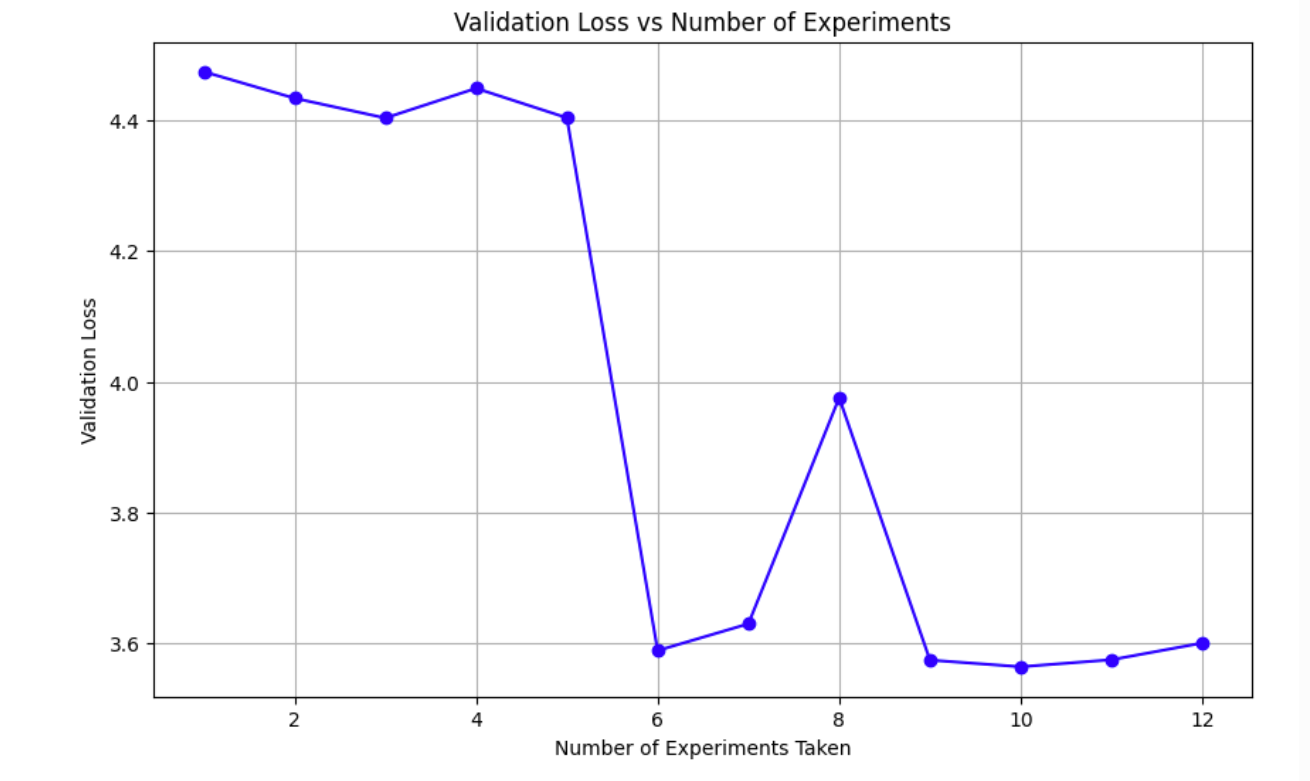
<p><strong>Validation loss not decreasing.</strong> At one point my validation loss was flat. The cause was surprising: I was calling <code class="language-plaintext highlighter-rouge">model.train()</code> and <code class="language-plaintext highlighter-rouge">model.eval()</code> in the estimation loop, but since I wasn’t using dropout, there was no behavioral difference between the two modes — except that <code class="language-plaintext highlighter-rouge">model.eval()</code> was activating the KV cache path, which was corrupting the loss computation. Removing those calls from the estimation function fixed it.</p>

<p><strong>CUDA device-side assert.</strong> After training, generation crashed with <code class="language-plaintext highlighter-rouge">CUDA error: device-side assert triggered</code>. The position embedding table had only 32 entries (<code class="language-plaintext highlighter-rouge">block_size = 32</code>), so generating 500 tokens tried to look up position 500 in a table that only goes to 31. The fix: cap <code class="language-plaintext highlighter-rouge">max_new_tokens</code> so that <code class="language-plaintext highlighter-rouge">prompt_length + max_new_tokens ≤ block_size</code>.</p>

<p>This is a real limitation worth calling out. With a fixed-size learned position embedding table, you can never generate more than <code class="language-plaintext highlighter-rouge">block_size</code> total tokens. Production models solve this with RoPE (Rotary Positional Embeddings), which computes position information on the fly instead of looking it up in a table, removing the sequence length cap entirely.</p>

<p>You can see the entire code on my GitHub: <a href="https://github.com/czhou578/multimodal-inference-visualizer/blob/main/nanogpt.ipynb">https://github.com/czhou578/multimodal-inference-visualizer/blob/main/nanogpt.ipynb</a></p>

<p>CZ</p>]]></content><author><name></name></author><summary type="html"><![CDATA[NanoGPT is Andrej Karpathy’s from-scratch GPT trained on Shakespeare — no abstractions, no optimizations, just the bare-minimum transformer you need to generate text. I wanted to understand how inference servers actually work, so I started at the bottom: adding a KV cache to this toy model by hand.]]></summary></entry><entry><title type="html">Building a Knowledge Base for AI Agents</title><link href="https://czhou578.github.io/blog/2026/04/16/knowledge-base.html" rel="alternate" type="text/html" title="Building a Knowledge Base for AI Agents" /><published>2026-04-16T00:00:00+00:00</published><updated>2026-04-16T00:00:00+00:00</updated><id>https://czhou578.github.io/blog/2026/04/16/knowledge-base</id><content type="html" xml:base="https://czhou578.github.io/blog/2026/04/16/knowledge-base.html"><![CDATA[<p>I saw a post on X recently from Andrej Karpathy about building a knowledge base, and taking advantage of modern frontier LLM’s to create specialized local knowledge troves that could be used to understand and synthesize large quantities of information.</p>

<p>In a sense, think of Wikipedia, but instead of having to manually maintain such a wiki, you instead have AI agents do the maintenance, and you as the human are only responsible for curating the initial set of documents and information that you want to be included in the knowledge base.</p>

<p>I thought this was a really interesting idea, and I decided to try it out for myself.</p>

<h2 id="motivation">Motivation</h2>

<p>Recently, my sister has been advancing a lot in her violin playing, and she’s been asked to take on more responsibilities not just for her school orchestra, but also for other events. Her classes are $120 an hour, and thus there is immense expectations for her to improve her playing due to this cost.</p>

<p>I wanted to do research into how to potentially build an AI agent violin consultant system that could take in audio recording of her playing and give specialized / targeted feedback to her. This would improve practice efficiency for my sister.</p>

<p>The problem was that I had no clue how to get started. Even though I’m a software engineer who took private piano lessons for over 10 years, I didn’t know much about translating music theory to technology like an AI agent. This was the perfect chance to build a specialized knowledge base to help me with this.</p>

<h2 id="curation">Curation</h2>

<p>I started by curating a list of documents that I thought would be relevant to this project. These included things like Python libraries of interest, chats with Claude about the topic, and other miscellaneous resources I found online. I planned my knowledge base to only take in documents in markdown format. In order to do so, I installed the Obsidion Chrome extension, which allows you to save web pages as markdown files. Obsidian was the note taking app of choice in the original knowledge base concept by Karpathy, but I personally don’t really use these kind of notetaking apps. But through my experimentation, having the extension made downloading information much easier, which I appreciated.</p>

<p>In my <code class="language-plaintext highlighter-rouge">_posts</code> folder, I now had a collection of markdown files spanning resources from many online sources. In order to create a real wiki, I used Claude Sonnet 4.6 in Antigravity IDE to create an implementation plan. It decided to create a single page application (SPA) inside the existing <code class="language-plaintext highlighter-rouge">wiki</code> directory. Inside of this directory were the <code class="language-plaintext highlighter-rouge">index.html</code> file, a <code class="language-plaintext highlighter-rouge">styles.css</code> file, and a <code class="language-plaintext highlighter-rouge">main.js</code> file. The <code class="language-plaintext highlighter-rouge">main.js</code> file was responsible for reading the markdown files and rendering them on the page, as well as handling the correct page routing.</p>

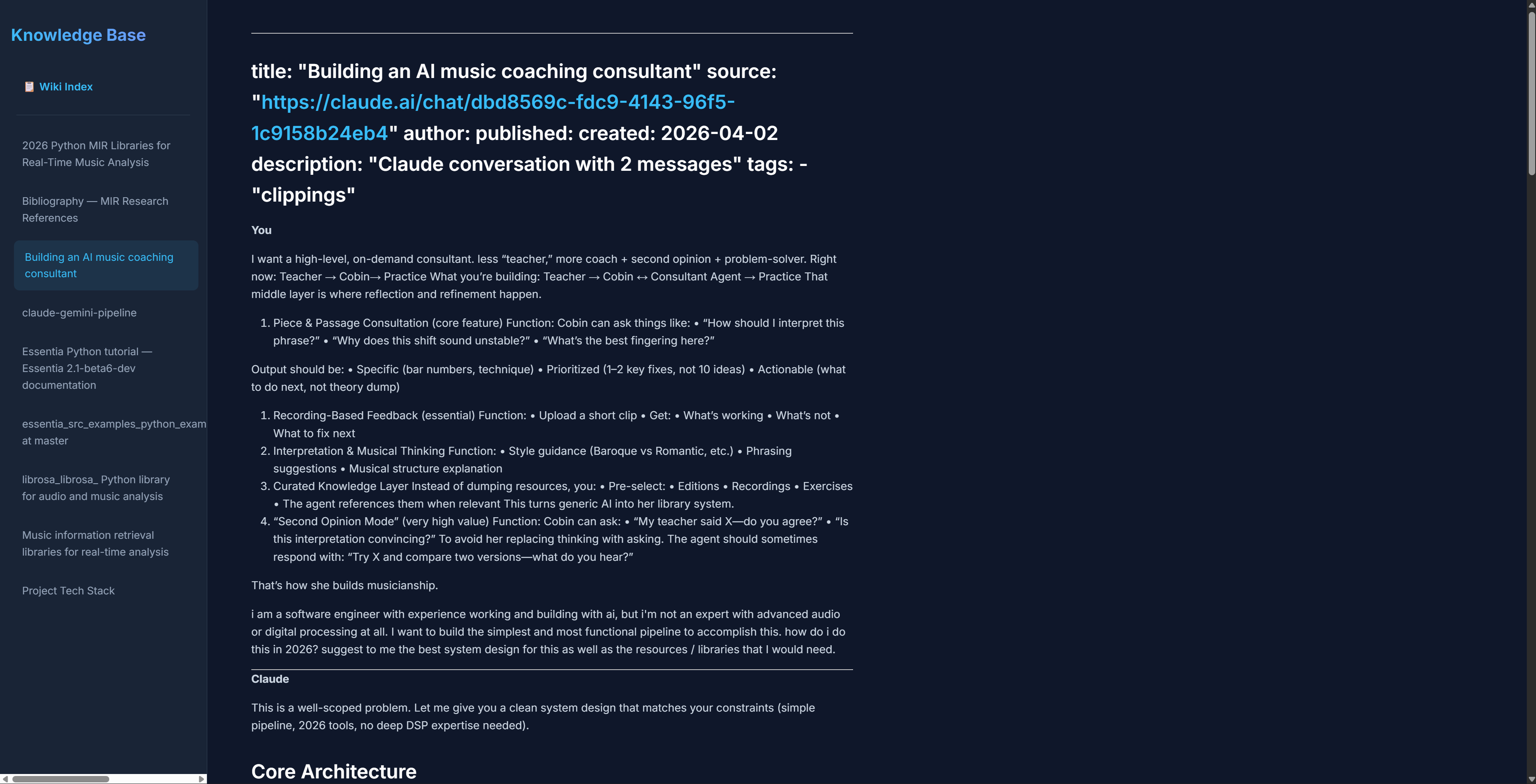
<p>The resulting page that I ended up seeing was basic but functional. Here is what it looked like:</p>

<p><img src="/blog/images/knowledge-base-1.png" alt="alt text" /></p>

<p>As you can see, it did have a sidebar of the pages that were available and also the actual page, with the title and the content formatted. It didn’t look completely professional, but it was a good start.</p>

<p>Finally, I asked Claude to create a bibliography page that would include all the links that were referenced in the markdown files. It did this successfully, and I was able to click on the links to visit the original sources.</p>

<p><img src="/blog/images/knowledge-base-4.png" alt="alt text" /></p>

<p>During this process, it created a json file called <code class="language-plaintext highlighter-rouge">wiki-index.json</code> that held the metadata for all the pages, including the links. I think this helped it greatly when it was diving deep into the knowledge base.</p>

<h2 id="problems">Problems</h2>

<p>Here were the problems I encountered:</p>

<ol>
  <li>
    <p>One of my resources in the markdown file had chunks of code from a Github repo page. When that was first rendered, it didn’t recognize the code blocks and displayed them as regular text. I had to explicitly tell Claude to format all code correctly in order for this to be fixed.</p>
  </li>
  <li>
    <p>Claude surprisingly had a lot of trouble with links. It would not make links clickable unless I specifically told it to. I don’t know if other LLM’s would have this issue, but it required extra prompting to work. It also had a tendency to include links in the titles of pages, which I had to remove. It turns out that this was due to the way that the sources were being downloaded by Obsidian’s chrome extension. It was adding a yaml header to the markdown downloads, which caused the CSS to be wonky in the beginning.</p>
  </li>
</ol>

<p>After I asked Claude to fix the errors with this prompt “Could you format the title and the tables in each page correctly? I want the link to the source to be displayed nicely under the main title, followed by the author, all without quotes.”, the issues were fixed.</p>

<ol>
  <li>Some of the formatting in other elements was also off, for example the tables:</li>
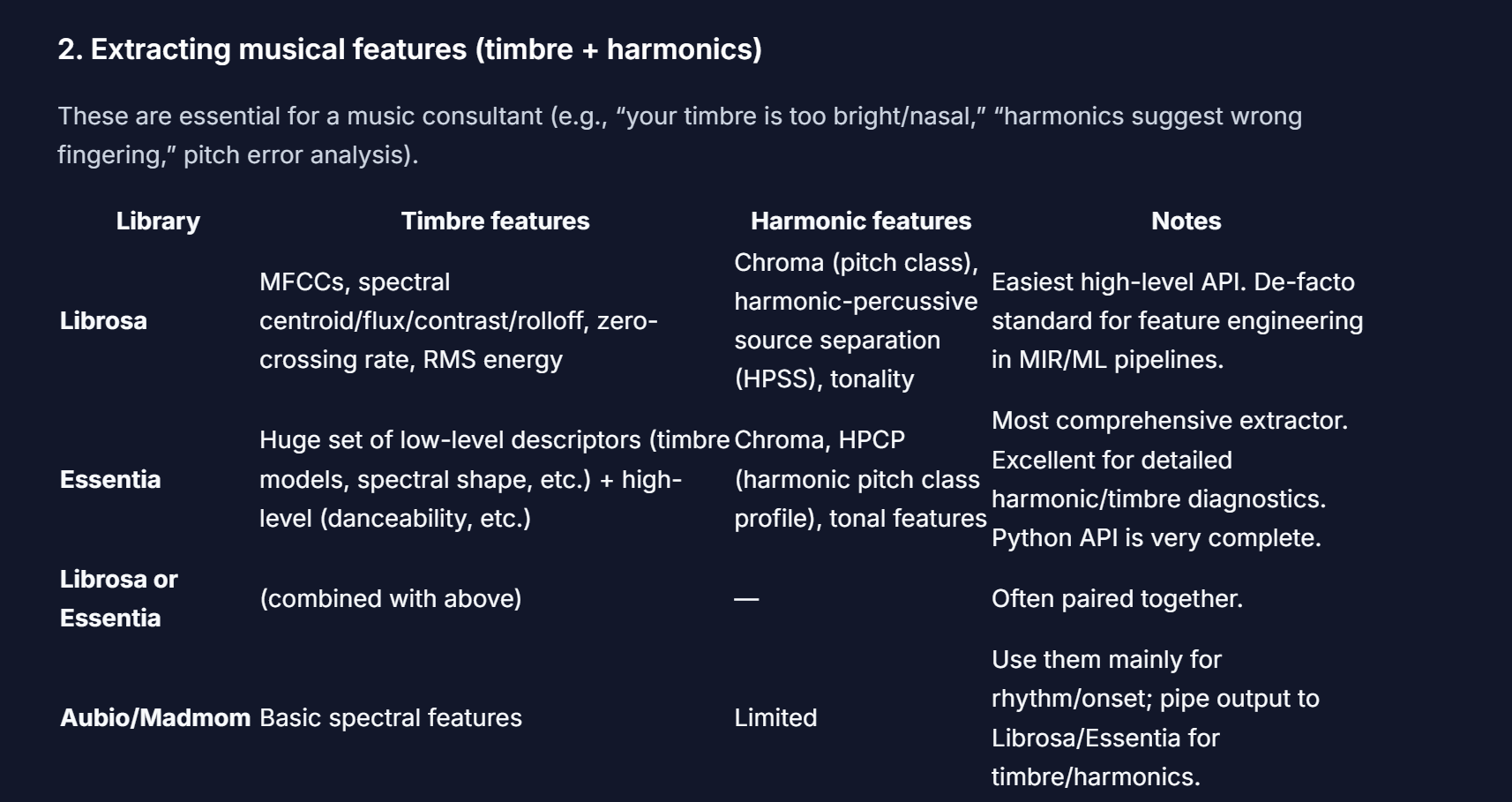
</ol>

<p><img src="/blog/images/knowledge-base-2.png" alt="alt text" /></p>

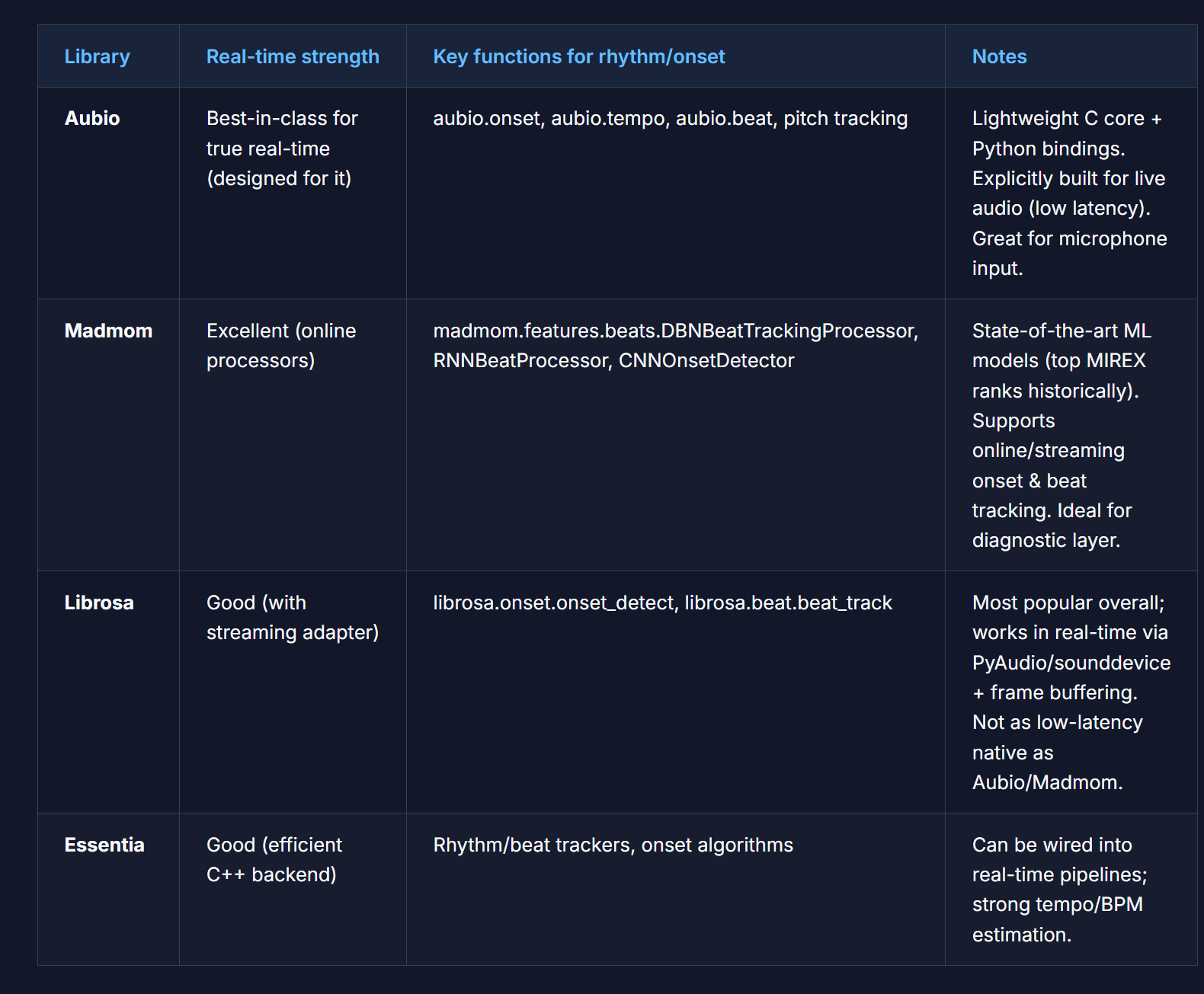
<p>In order to fix this, I had to tell Claude to increase the padding on the columns of the tables. It actually did a very good job, and the result looked something like this:</p>

<p><img src="/blog/images/knowledge-base-3.png" alt="alt text" /></p>

<h2 id="agent-instructions">Agent Instructions</h2>

<p>Here were the files that I created to help Claude and other AI agents with navigating this codebase:</p>

<p><code class="language-plaintext highlighter-rouge">AGENTS.md</code>: This file contained the instructions for Claude on how to behave and what its goals were. For this one, I took a lot of inspiration from Karpathy’s GitHub (gist)[https://gist.github.com/karpathy/442a6bf555914893e9891c11519de94f]. It describes multiple operations that can be performed (ingest, query, lint, etc.) and describes the scenarios of which they should be perform.</p>

<p><code class="language-plaintext highlighter-rouge">log.md</code>: This log contained the history of all the operations that were performed on the knowledge base. It was a chronological record of all the changes that were made to the knowledge base, including the date and time of the operation, the type of operation, and the result of the operation.</p>

<p><code class="language-plaintext highlighter-rouge">wiki-index.json</code>: This json file contained the metadata for all the pages in the knowledge base, including the links to the original sources. It contained information like the number of words, and additional good-to-know details like the title, link, and so forth. In a sense, it is kind of redundant since the <code class="language-plaintext highlighter-rouge">log.md</code> file will keep track of a lot of the same information, but I decided to keep it in there as a redundancy.</p>

<h2 id="testing">Testing</h2>

<p>To test, I launched a query in my Antigravity IDE’s sidebar agent console to Claude. My query was “What is the ideal pipeline that i can use to build the violin agent? consult the sources in raw folder”.</p>

<p>Claude’s response was to do the following:</p>

<ul>
  <li>Edit <code class="language-plaintext highlighter-rouge">log.md</code> to include the query and response in the history</li>
  <li>Create a new file called <code class="language-plaintext highlighter-rouge">Ideal Pipeline — Violin Coaching Agent.md</code> with the answer content</li>
  <li>Edit <code class="language-plaintext highlighter-rouge">wiki-index.json</code> to include the new page</li>
</ul>

<p>Honestly, I was quite surprised that it was smart enough to create the new file, add that to my knowledge base, and then update the index. I didn’t even have to prompt it to do so! The answer content itself drew from 6 sources that I had previously curated and correctly displayed the code, along with all explanations in an easy to read format.</p>

<p>In addition, when I tried to hijack the system by asking Claude to “Use the wiki and answer are cats the best animal in the world?”, it refused to do so by saying that the wiki contents were not related to my query and that I would need to ingest a related source in order to get an answer! Amazing stuff here…</p>

<h2 id="conclusion">Conclusion</h2>

<p>Overall, I still think that the bottleneck is that not only do you have to manually curate the downloads, but also you have to restart the developer server every time a download comes in, which is not ideal. I don’t know exactly what it would take to have something that is dynamically listening for new articles being added into the <code class="language-plaintext highlighter-rouge">outputs</code> folder, but that would give a much more responsive feel to the whole app.</p>

<p>In addition, I was testing the application by running queries in the sidebar agent console in Antigravity IDE, which feels a bit strange. If it was possible to create some kind of input area on the frontend and then get back the results without having to resort to my IDE, I think that would be a great benefit as well.</p>

<p>In addition, it would be better for the user to define the CSS rules for the wiki somewhere in an <code class="language-plaintext highlighter-rouge">AGENTS.md</code> file or similar, as I found that adding new articles into the wiki did not automatically make it adhere to the same CSS rules as the other pages!</p>

<p>My GitHub repo with the code is <a href="https://github.com/czhou578/knowledge-base">here</a>.</p>

<p>What do you think? I will love to hear your thoughts!</p>

<p>CZ</p>]]></content><author><name></name></author><summary type="html"><![CDATA[I saw a post on X recently from Andrej Karpathy about building a knowledge base, and taking advantage of modern frontier LLM’s to create specialized local knowledge troves that could be used to understand and synthesize large quantities of information.]]></summary></entry><entry><title type="html">I Trained an AI to Speak Like JFK</title><link href="https://czhou578.github.io/blog/2026/04/07/jfk-voice-clone.html" rel="alternate" type="text/html" title="I Trained an AI to Speak Like JFK" /><published>2026-04-07T00:00:00+00:00</published><updated>2026-04-07T00:00:00+00:00</updated><id>https://czhou578.github.io/blog/2026/04/07/jfk-voice-clone</id><content type="html" xml:base="https://czhou578.github.io/blog/2026/04/07/jfk-voice-clone.html"><![CDATA[<p><img src="/blog/images/jfk.png" alt="alt text" /></p>

<p>As someone who has always been fascinated by history and the events of the 20th century, I’ve always been keen to explore alternate scenarios, where a famous historical figure lived to see an event that didn’t occur when they were alive.</p>

<p>John F. Kennedy was the 35th president of the United States who was tragically assassinated in 1963. Many do not know that when he was shot, in his clothing was a copy of a speech that he was scheduled to give later that day at the Dallas Trade Mart. The turkey and lunch had already been served, awaiting the arrival of a president who would never make it.</p>

<p>For a long time, I was interested in the idea of what Kennedy would’ve sounded like  had he made to lunch safely that day and delivered this speech.</p>

<p>Thankfully, in this age of AI, that is now possible to discover.</p>

<p>I decided to create a system that would train on a corpus of JFK’s speeches from his term in office, and then have that replicated voice read that last Dallas Trade Mart speech, lyrics, and
more. This has been a project dream of mine for many years.</p>

<h2 id="technologies">Technologies</h2>

<p>I first had to pick out the tech stack I was going to use. Python was an easy language choice for ML purposes. In terms of the finetuning model, I could have developed this myself, but I
decided to use the F5 TTS open source voice cloning model from GitHub. The reason why was that through Reddit comments and my online research, many people mentioned this as an ideal 
choice if my priority was speed of cloning. This was also backed up by Claude, who gave me other options like XTTS, but mentioned that F5 was well maintained and optimized for speed. I wasn’t willing to pay for ElevenLabs or a third party proprietary API.</p>

<p>For GPU, I rented an RTX 4000 Ada GPU on Runpod for about $0.27/hr. I was debating whether or not to use the more powerful RTX 4090 or RTX 5090, but as it turned out through my
experiments, the budget GPU actually performed very well in terms of inference time. I spent a total of approximately $2 to fully finish this project, which I’m very happy about.</p>

<p>For storing big chunks of data, I initially chose Git LFS since it’s just a natural extension of using Git. But having a HuggingFace repo to store the model checkpoints was a big convenience for me.</p>

<h2 id="data-downloading">Data Downloading</h2>

<p>In order to get the voice of JFK to be as good as possible, I found a 4 hour clip of JFK’s speeches from various events on YouTube (yes, that does exist), and I converted it to a large mp3
file. This took a while since a lot of online YouTube to mp3 converters don’t accept clips of that long. I ended up using the <code class="language-plaintext highlighter-rouge">yt-dlp</code> library from Python, which directly downloaded the audio from YouTube using the video url into 16 kHz mono WAV format.</p>

<p>Then, the downloaded audio went through a pipeline with the following steps:</p>

<h3 id="denoising">Denoising</h3>
<p>In the original clip, because the recordings were made in a live environment, there were many instances of clapping, background noise, and other disturbances. To clean these
out of the final chunked training audio, the massive clip was fed through the <code class="language-plaintext highlighter-rouge">resemble</code> library in Python, which performed the audio cleaning in conjunction with the <code class="language-plaintext highlighter-rouge">torchaudio</code>
library. The repo link to <code class="language-plaintext highlighter-rouge">resemble</code> is <a href="https://github.com/resemble-ai/resemble-enhance">here</a>. I only needed to call the <code class="language-plaintext highlighter-rouge">denoise</code> function once to get the tensor containing the audio, and then using <code class="language-plaintext highlighter-rouge">torchaudio</code>, saved it to a local file.</p>

<h3 id="transcription-and-segmentation">Transcription and Segmentation</h3>

<p>Next was the transcription, since the training process needed labels of the spoken audio for validation purposes and for reference text (for inference). For this step, I utilized the WhisperX model (imported Python package) mainly because it is considered to be one of the highest value models for transcription and word processing, as well as Voice Activity Detection (VAD). I used WhisperXto apply VAD,
transcribe with timestamps, and return the list of segments, which are just the start and end timestamps, and the text spoken in between these two. The VAD removed the silences and the non-speech segments automatically.</p>

<h3 id="slice-and-export">Slice and Export</h3>

<p>Finally, I called a function to slice and export the audio into multiple smaller chunks, and build a csv file containing the audio file names and its corresponding transcription for that clip that was generated from the previous step. By default, I added an argument parser so that users can specify how long the audio clips should be. By default, I used 3 seconds to 15 seconds as the range. If there are segments that are too long, they are simply thrown out. Any segments that are missing text or timestamps are also thrown out. The csv file holding the metadata, and all of the audio files (1801 of them) were then saved to a folder in my project.</p>

<h2 id="finetuning">Finetuning</h2>

<p>For the finetuning step, I asked Claude to write and then modify a script in order to perform the training. I first cloned the F5 GitHub repo to my project and added it as a 
git submodule. I then created a virtual environment in the project and installed all my dependencies like PyTorch, the HuggingFace accelerate library, and all the libraries needed to run my local scripts and the
F5 module. I then prepared the dataset, copying all the chunked .wav files to the correct location as expected by F5, and also made sure that if this was the first time that
I pulled from remote repo, that there was actual data in the wav folder and the csv files, and not their respective Git submodule pointers (encountered this issue more then once, lol).</p>

<p>I then converted metadata.csv + wavs into raw.arrow and duration.json, which the F5 library needs for efficient training. If this was not done, then there would be a lot of costly I/O operations because the backend would have to read the audio, parse the csv to find the right entry for this audio clip, and match the text + audio.</p>

<p>Apache Arrow and its format allows for memory efficient storage of this information, for example audio decoded into arrays, text, and the sample rate all in one line entry.</p>

<p>On the other hand, the <code class="language-plaintext highlighter-rouge">duration.json</code> file serves to help F5 be more efficient with its batching for training. Ideally, similar length audio clips are grouped together in batches to minimize padding, which is wasted computation.</p>

<p>I then modified the accelerate config so that the accelerate library specifically would be ready for the training. This was done by modifying the <code class="language-plaintext highlighter-rouge">default_config.yaml</code> file, which contains tunable settings for the training process, like mixed precision, distributed training, number of processes, etc.</p>

<p>Then, I officially launched the finetuning, which would perform the specified epochs, using the hyperparameters defined at the top of the file, and then save checkpoints every so often until the training is done.</p>

<h2 id="inference">Inference</h2>

<p>I then ran the <code class="language-plaintext highlighter-rouge">inference.py</code> which is a script that would create a .wav file in the outputs folder based on the command line or text file arguments with the speech that
is going to be read. You can select the wav file that would serve as the reference audio clip, and then update the corresponding reference text with the text from that clip.</p>

<p>The inference script contains multiple options as command line options, such as the reference audio clip, the reference text, the output file name etc, and the checkpoint directory. It will use the specified checkpoint passed in as the model to use for inference.</p>

<h2 id="problems-encountered">Problems Encountered</h2>

<p>There were several issues that I ran into during this project.</p>

<ol>
  <li>
    <p>I initially ran into storage issues in RunPod due to the number of wav files and the checkpoints from the model training. If you want to replicate my code on RunPod, I would suggest having at least 40GB of storage.</p>
  </li>
  <li>
    <p>It is important to know how to save your checkpoints. I used HuggingFace’s Git LFS to store my checkpoints, but it is very easy to get mixed up with using Git LFS in conjunction with Git submodules. There were many times when I forgot to run <code class="language-plaintext highlighter-rouge">git lfs pull</code> before running the training script, or forgot to sync using git submodules the files that I needed, like the csv file, or the wav files.</p>
  </li>
  <li>
    <p>During model finetuning, I had issues where old checkpoints of a previous run were being reused. For example, if I had a trial run that did 30 epochs, then a 50 epoch run would run strangely fast since it was not actually training from scratch. To fix this, I had to modify my training script such that each experiment would get its own checkpoint directory.</p>
  </li>
  <li>
    <p>When doing inference, I realized that there were the word “government” interspersed in the final audio recording. In addition, when I first asked it to read Taylor Swift’s Blank Space lyrics, the AI voice speed ran through the lyrics, without respecting the line breaks or pauses. To fix the first issue, it turns out that F5 by default requires that the reference text be exactly the same as the reference audio.</p>
  </li>
</ol>

<p>In order to fix the second issue, I had to modify the inference script to add pauses between lines. I added a pause parameter that can be adjusted (I used 0.7 seconds) to insert pauses between lines. In addition, I also added a mode parameter that would take two values: “lines” or “sentences”, with a default of “lines”. In the original text file containing the lyrics, there were no punctuation between lines, so the inference script was just reading the text as one long string. Now, if the mode was set to “lines”, then it would present every line break as the end of a line. Otherwise, if the mode was set to “sentences”, then it would present every punctuation mark as the end of a line.</p>

<ol>
  <li>One unique thing about JFK’s speeches is that the microphone quality from the 1960s were obviously much worse then they are today. In the beginning, the reference audio clip that I used was a very clear sounding clip, which to me made it seem very strange. So I actually switched it out for another clip that had more background noise and static, which to me sounded more authentic to the time period (LOL).</li>
</ol>

<h2 id="takeaways">Takeaways</h2>

<p>My biggest takeaways from this project is that it is possible to recreate someone’s voice from audio clips, all for free. It is quite amazing the ecosystem that has developed for such projects to be doable. The GPU resources needed were not very expensive at all which was surprising.</p>

<p>There are a few things that would be worth exploring in the future.</p>

<ol>
  <li>
    <p>How long of a testing clip in the beginning do you really need in order to get a good transcription? I used a clip that was 4 hrs, but would 2 hrs be enough?</p>
  </li>
  <li>
    <p>What is the perfect set of hyperparameters to use for best results? This will always be a work in progress.</p>
  </li>
  <li>
    <p>Are there other TTS libraries out there that would be better for this project?</p>
  </li>
  <li>
    <p>Right now, I have to manually go through the list of wav files that were from the dataset to use as a reference. I wonder if there is a programmatic way of doing this, based on some formula or some baseline metric.</p>
  </li>
</ol>

<h2 id="conclusion">Conclusion</h2>

<p>This project was a dream come true for me that I had planned for over a year. I’m very happy with the final result and learned a lot about setting up and using an open source TTS library. It does bring up some interesting questions about the ethics of using AI in this way. If such technology is already this accessible and will only get better, can we trust it to not be misused?</p>

<p>A voice clone of the president ordering an invasion of another country could be easily misinterpreted as real, and could have dire consequences, like starting a war that kills millions.</p>

<p>At the end, I was able to generate clips of JFK’s voice reading Taylor Swift lyrics, the 2025 inauguration speech, and more. I highly recommend trying it out if you have the time and resources!</p>

<h2 id="sources-and-results">Sources and Results</h2>

<p>In my repository, I have the entire list of .wav files that I used, as well as the scripts for inference, data loading, and training. I also have a markdown file that lists all of the experiments I ran for finetuning, and what hyperparams that I used.</p>

<p><a href="https://github.com/czhou578/jfk-voice-clone">GitHub Repository</a></p>

<p>For your listening enjoyment, here are the audio clips that I generated using the finetuned model.</p>

<h3 id="taylor-swifts-blank-space">Taylor Swift’s Blank Space</h3>

<audio controls="" src="/blog/audio/blank_space_official.wav"></audio>

<h3 id="jfks-dallas-trade-mart-speech-undelivered-112263">JFK’s Dallas Trade Mart Speech (undelivered 11/22/63)</h3>

<audio controls="" src="/blog/audio/jfk_undelivered_speech_2.wav"></audio>

<h3 id="2025-presidential-inauguration-speech">2025 Presidential Inauguration Speech</h3>

<audio controls="" src="/blog/audio/covfefe_speech.wav"></audio>

<p>Thanks for reading!</p>

<p>CZ</p>]]></content><author><name></name></author><summary type="html"><![CDATA[]]></summary></entry><entry><title type="html">Building a Local Voice Agent on CPU</title><link href="https://czhou578.github.io/blog/2026/04/05/my-own-voice-agent.html" rel="alternate" type="text/html" title="Building a Local Voice Agent on CPU" /><published>2026-04-05T00:00:00+00:00</published><updated>2026-04-05T00:00:00+00:00</updated><id>https://czhou578.github.io/blog/2026/04/05/my-own-voice-agent</id><content type="html" xml:base="https://czhou578.github.io/blog/2026/04/05/my-own-voice-agent.html"><![CDATA[<p>I have seen online the growing prevalence of people running local AI models on their personal devices and interacting with them through voice. For a long time, I ignored the hype simply because I didn’t believe that my 2022 Lenovo Thinkpad X1 Carbon PC could be capable of running any AI model on a usefulness basis.</p>

<p>But after seeing the new Alibaba Qwen 3.5 family of models drop and seeing people running it on their phones, I became intrigued at how my PC could run it, especially since I do have 16 GB of RAM and 1 TB of SSD storage. Here was my experience attempting to create a voice agent that would leverage Qwen to perform basic browser operations like opening up and replaying YouTube videos, launching search queries, and controlling my browser like an agent. I used pure Python for development.</p>

<h1 id="setup">Setup</h1>

<p>I started by installing Ollama, which is a tool that allows you to run large language models locally. I installed it on my Windows PC using their official installer in PowerShell.</p>

<p>Next, I installed the Qwen 3.5 model using the following command:</p>

<div class="language-bash highlighter-rouge"><div class="highlight"><pre class="highlight"><code>ollama run qwen3.5:4b
</code></pre></div></div>

<p>I chose Ollama because according to Grok, it is one of the most popular tools for running local AI models and it is tailored to developers.</p>

<p>The actual install for Qwen 3.5 didn’t take very long, and I was able to open its console up in my Windows terminal and send commands to it pretty easily. I averaged around 14 tokens per second, which on my Intel CPU, wasn’t as bad as I expected. My goal was just to have the tokens/sec be sufficient enough that there wouldn’t be too much latency. My priority wasn’t to have the model write essays, but to execute short and succinct commands.</p>

<p>My goal was to create a fully end to end voice agent, that would take in my spoken input, translate late it into text, get the response from Qwen, and then recite it back to me.</p>

<h1 id="agent-evolution">Agent Evolution</h1>

<p>I started off using pyttsx3 for text to speech, since it was recommended by Grok as a popular choice. I also began with SpeechRecognition, which is a Python library for speech recognition and a wrapper around many major speech recognition APIs from Google and more. Google’s Web Speech API happened to be a free service to use so I went with that.</p>

<p>The problem was that the Google Speech API does have a rate limit which could be exceeded, prompting errors when calling it programmatically, and also requires internet use, which I didn’t like because I preferred something that I could run locally.</p>

<p>So I switched over to Vosk, which was suggested by Claude after some prompting.</p>

<p>Vosk is a local toolkit for speech recognition that supports over 20 languages, runs on CPU, and are small in terms of model size (50mb according to their documentation). That ended up working just as well with not much latency.</p>

<h1 id="browser-automation">Browser Automation</h1>

<p>I had some previous knowledge of using frameworks like Playwright to automate the browser, so I ended up integrating that into my project. Structurally, I added the browser logic as a “skill” into my project, where there was a global class called BrowserManager which contained all the methods for the browser automation, like the initialization lifecycle. It also contains the methods for Playwright to perform operations in the browser like navigate_to, which opens a new tab and navigates to a URL.</p>

<p>I also had to add a system prompt for Qwen in order to help it understand the browser task. It basically told Qwen to output either [SEARCH] or [Navigate] at the beginning of each answer that is brower related. Based on which one it returns, a different Playwright method would be called.</p>

<p>Here is what the prompt looked like:</p>

<div class="language-plaintext highlighter-rouge"><div class="highlight"><pre class="highlight"><code>SYSTEM_PROMPT = """You are a helpful voice assistant named Qwen. 
You must strictly follow these exact command formats for actions:

- To search Google: [SEARCH] query here
- To search YouTube: [YOUTUBE] query here
- To restart a YouTube video: [YOUTUBE_REPLAY]
- To play the first YouTube video result: [YOUTUBE_CLICK_FIRST]
- To open a website: [NAVIGATE] example.com

Example 1:
User: "Search for cat videos on YouTube"
Assistant: [YOUTUBE] cat videos

Example 2:
User: "Go to reddit"
Assistant: [NAVIGATE] reddit.com

Example 3:
User: "How are you today?"
Assistant: I am doing well, thank you!

For general questions, answer verbally in 1-2 short, natural sentences without abbreviations. 
IMPORTANT RULE: When you output a command, you MUST NOT output any other text. Output literally ONLY the command format. Do NOT invent new brackets."""

</code></pre></div></div>

<h1 id="improving-tts-and-running-the-agent">Improving TTS And Running the Agent</h1>

<p>After continuously playing around with the model, I realized that from the TTS side of things, the voice lacked emotion and sounded robotic. In addition, there was also a noticeable latency (over 5 seconds) every turn when waiting for the model response. I looked into alternatives and found out about Piper TTS, which is a fast, local, and high quality TTS engine that is based on the VITS model. I also did look into Kokoro TTS, which I have actual work-related experience in but the setup was going to take much longer.</p>

<p>To integrate Piper into my project, I had to implement a queue based architecture rather then the single engine approach I had before. The reason for this was so that in the background, the TTS engine could generate the audio without blocking the main loop.</p>

<p>Here is a snippet of this code:</p>

<div class="language-python highlighter-rouge"><div class="highlight"><pre class="highlight"><code><span class="n">tts_queue</span> <span class="o">=</span> <span class="n">queue</span><span class="p">.</span><span class="n">Queue</span><span class="p">()</span>

<span class="k">def</span> <span class="nf">tts_worker</span><span class="p">():</span>
    <span class="s">"""Background thread for continuous Text-to-Speech processing."""</span>
    <span class="n">PIPER_MODEL_PATH</span> <span class="o">=</span> <span class="s">"en_US-lessac-medium.onnx"</span>
    <span class="n">use_piper</span> <span class="o">=</span> <span class="bp">False</span>
    
    <span class="k">try</span><span class="p">:</span>
        <span class="k">if</span> <span class="n">os</span><span class="p">.</span><span class="n">path</span><span class="p">.</span><span class="n">exists</span><span class="p">(</span><span class="n">PIPER_MODEL_PATH</span><span class="p">):</span>
            <span class="n">piper_engine</span> <span class="o">=</span> <span class="n">PiperVoice</span><span class="p">.</span><span class="n">load</span><span class="p">(</span><span class="n">PIPER_MODEL_PATH</span><span class="p">)</span>
            <span class="n">piper_sample_rate</span> <span class="o">=</span> <span class="n">piper_engine</span><span class="p">.</span><span class="n">config</span><span class="p">.</span><span class="n">sample_rate</span>
            <span class="n">use_piper</span> <span class="o">=</span> <span class="bp">True</span>
            <span class="k">print</span><span class="p">(</span><span class="s">"[System] Loaded Piper TTS Model."</span><span class="p">)</span>
        <span class="k">else</span><span class="p">:</span>
            <span class="k">raise</span> <span class="nb">FileNotFoundError</span><span class="p">(</span><span class="s">"Piper model not found locally."</span><span class="p">)</span>
    <span class="k">except</span> <span class="nb">Exception</span> <span class="k">as</span> <span class="n">e</span><span class="p">:</span>
        <span class="k">print</span><span class="p">(</span><span class="sa">f</span><span class="s">"[System] Piper error fallback to pyttsx3: </span><span class="si">{</span><span class="n">e</span><span class="si">}</span><span class="s">"</span><span class="p">)</span>
        <span class="c1"># We must initialize pyttsx3 inside the thread loop for safety in some OS environments
</span>        <span class="n">tts_engine</span> <span class="o">=</span> <span class="n">pyttsx3</span><span class="p">.</span><span class="n">init</span><span class="p">()</span>
        <span class="n">tts_engine</span><span class="p">.</span><span class="n">setProperty</span><span class="p">(</span><span class="s">'rate'</span><span class="p">,</span> <span class="mi">160</span><span class="p">)</span>
        
    <span class="k">while</span> <span class="bp">True</span><span class="p">:</span>
        <span class="n">text</span> <span class="o">=</span> <span class="n">tts_queue</span><span class="p">.</span><span class="n">get</span><span class="p">()</span>
        <span class="k">if</span> <span class="n">text</span> <span class="ow">is</span> <span class="bp">None</span><span class="p">:</span>
            <span class="k">break</span>
            
        <span class="k">print</span><span class="p">(</span><span class="sa">f</span><span class="s">"</span><span class="se">\n</span><span class="s">[Qwen] </span><span class="si">{</span><span class="n">text</span><span class="si">}</span><span class="s">"</span><span class="p">)</span>
        
        <span class="k">if</span> <span class="n">use_piper</span><span class="p">:</span>
            <span class="k">try</span><span class="p">:</span>
                <span class="n">stream</span> <span class="o">=</span> <span class="n">sd</span><span class="p">.</span><span class="n">OutputStream</span><span class="p">(</span><span class="n">samplerate</span><span class="o">=</span><span class="n">piper_sample_rate</span><span class="p">,</span> <span class="n">channels</span><span class="o">=</span><span class="mi">1</span><span class="p">,</span> <span class="n">dtype</span><span class="o">=</span><span class="s">'int16'</span><span class="p">)</span>
                <span class="n">stream</span><span class="p">.</span><span class="n">start</span><span class="p">()</span>
                <span class="k">for</span> <span class="n">chunk</span> <span class="ow">in</span> <span class="n">piper_engine</span><span class="p">.</span><span class="n">synthesize</span><span class="p">(</span><span class="n">text</span><span class="p">):</span>
                    <span class="n">stream</span><span class="p">.</span><span class="n">write</span><span class="p">(</span><span class="n">chunk</span><span class="p">.</span><span class="n">audio_int16_array</span><span class="p">)</span>
                <span class="n">stream</span><span class="p">.</span><span class="n">stop</span><span class="p">()</span>
                <span class="n">stream</span><span class="p">.</span><span class="n">close</span><span class="p">()</span>
            <span class="k">except</span> <span class="nb">Exception</span> <span class="k">as</span> <span class="n">e</span><span class="p">:</span>
                <span class="k">print</span><span class="p">(</span><span class="sa">f</span><span class="s">"[System] Piper playback failed: </span><span class="si">{</span><span class="n">e</span><span class="si">}</span><span class="s">"</span><span class="p">)</span>
        <span class="k">else</span><span class="p">:</span>
            <span class="n">tts_engine</span><span class="p">.</span><span class="n">say</span><span class="p">(</span><span class="n">text</span><span class="p">)</span>
            <span class="n">tts_engine</span><span class="p">.</span><span class="n">runAndWait</span><span class="p">()</span>
            
        <span class="n">tts_queue</span><span class="p">.</span><span class="n">task_done</span><span class="p">()</span>

<span class="c1"># Start TTS background thread
</span><span class="n">tts_thread</span> <span class="o">=</span> <span class="n">threading</span><span class="p">.</span><span class="n">Thread</span><span class="p">(</span><span class="n">target</span><span class="o">=</span><span class="n">tts_worker</span><span class="p">,</span> <span class="n">daemon</span><span class="o">=</span><span class="bp">True</span><span class="p">)</span>
<span class="n">tts_thread</span><span class="p">.</span><span class="n">start</span><span class="p">()</span>

</code></pre></div></div>

<p>*I also experienced this at work when developing such systems using GPU’s, which is that the response to the very first turn takes a long time, since the model needs to be loaded into memory. To fix this issue for this project, I had a silent request be made to Qwen at the very beginning so that it would be ready for the first real user request.</p>

<hr />

<p>I had to open up Brave browser in developer mode in order to have the browser operations to work. I don’t know if this is required for other browsers like Safari or Chrome, but it was just adding a flag to the cmd line to lauch the browser.</p>

<p>At this point, I could speak into the microphone and tell the voice agent to open YouTube and play a video! The latency was still very noticeable, but the browser automation worked as expected.</p>

<h1 id="memory">Memory</h1>

<p>Towards the end, I saw a need for the agent to remember everything in a session. Previously, if I told the agent to open up a YouTube video and then play it, the first action would be done, but the second would be skipped. I would have no way of prompting the agent to accurately go off of the last command’s result.</p>

<p>Due to the inherent limitations of my hardware and how I prioritized simplicity, I decided to create a simple in-memory solution, where a simple array in the main thread is created that would store the agent and user messages one after the other.</p>

<p>Here is a simplified version of what it looked like:</p>

<div class="language-python highlighter-rouge"><div class="highlight"><pre class="highlight"><code>
<span class="c1"># Initialize memory
</span><span class="n">memory</span> <span class="o">=</span> <span class="p">[]</span>

<span class="c1"># Add user message
</span><span class="n">memory</span><span class="p">.</span><span class="n">append</span><span class="p">({</span><span class="s">"role"</span><span class="p">:</span> <span class="s">"user"</span><span class="p">,</span> <span class="s">"content"</span><span class="p">:</span> <span class="n">user_input</span><span class="p">})</span>

<span class="c1"># Get response from Qwen
</span><span class="n">response</span> <span class="o">=</span> <span class="n">qwen</span><span class="p">.</span><span class="n">generate</span><span class="p">(</span><span class="n">messages</span><span class="o">=</span><span class="n">memory</span><span class="p">)</span>

<span class="c1"># Add assistant message
</span><span class="n">memory</span><span class="p">.</span><span class="n">append</span><span class="p">({</span><span class="s">"role"</span><span class="p">:</span> <span class="s">"assistant"</span><span class="p">,</span> <span class="s">"content"</span><span class="p">:</span> <span class="n">response</span><span class="p">})</span>

</code></pre></div></div>

<p>The one caveat was that I could only save the last 10 messages, otherwise the history would get too long and the pollution would start to affect the model’s behavior. In my case, it didn’t matter that much since I wasn’t performing long chains of thought or operations that would run a long time without my input.</p>

<h1 id="whisper-model">Whisper Model</h1>

<p>As a final test, I decided to ask Gemini if there were any other possible options for STT in python that is free and highly reliable with low latency. It eventually gave me several options but recommended Faster-Whisper, which is a Python implementation of OpenAI’s Whisper model that is optimized for speed and efficiency.</p>

<p>I ended up replacing Vosk with Faster-Whisper using int8 quantization on CPU, which performed satisfactorily in terms of transcribing my voice into text for the agent, only taking 2-3 seconds now.</p>

<p>For the system that I wanted to build, this kind of quantization was the best tradeoff between speed and accuracy.</p>

<p>Here is a snippet of my code:</p>

<div class="language-python highlighter-rouge"><div class="highlight"><pre class="highlight"><code>
<span class="k">class</span> <span class="nc">STTManager</span><span class="p">:</span>
    <span class="k">def</span> <span class="nf">__init__</span><span class="p">(</span><span class="bp">self</span><span class="p">):</span>
        <span class="k">print</span><span class="p">(</span><span class="s">"</span><span class="se">\n</span><span class="s">[System] Loading Faster-Whisper Model (base.en)..."</span><span class="p">)</span>
        <span class="c1"># Run on CPU with int8 quantization for speed on typical desktop CPUs
</span>        <span class="bp">self</span><span class="p">.</span><span class="n">model</span> <span class="o">=</span> <span class="n">WhisperModel</span><span class="p">(</span><span class="s">"base.en"</span><span class="p">,</span> <span class="n">device</span><span class="o">=</span><span class="s">"cpu"</span><span class="p">,</span> <span class="n">compute_type</span><span class="o">=</span><span class="s">"int8"</span><span class="p">)</span>
        
        <span class="k">print</span><span class="p">(</span><span class="s">"[System] Initializing Microphone..."</span><span class="p">)</span>
        <span class="bp">self</span><span class="p">.</span><span class="n">recognizer</span> <span class="o">=</span> <span class="n">sr</span><span class="p">.</span><span class="n">Recognizer</span><span class="p">()</span>
        <span class="bp">self</span><span class="p">.</span><span class="n">recognizer</span><span class="p">.</span><span class="n">energy_threshold</span> <span class="o">=</span> <span class="mi">300</span>  <span class="c1"># Adjust if it's too sensitive or not sensitive enough
</span>        <span class="bp">self</span><span class="p">.</span><span class="n">recognizer</span><span class="p">.</span><span class="n">dynamic_energy_threshold</span> <span class="o">=</span> <span class="bp">False</span>
        
        <span class="c1"># Increase pause threshold so it doesn't aggressively cut off the end of your sentence
</span>        <span class="c1"># if you pause slightly before saying "YouTube"
</span>        <span class="bp">self</span><span class="p">.</span><span class="n">recognizer</span><span class="p">.</span><span class="n">pause_threshold</span> <span class="o">=</span> <span class="mf">1.5</span>
        <span class="bp">self</span><span class="p">.</span><span class="n">recognizer</span><span class="p">.</span><span class="n">non_speaking_duration</span> <span class="o">=</span> <span class="mf">0.5</span>
        
        <span class="bp">self</span><span class="p">.</span><span class="n">microphone</span> <span class="o">=</span> <span class="n">sr</span><span class="p">.</span><span class="n">Microphone</span><span class="p">(</span><span class="n">sample_rate</span><span class="o">=</span><span class="mi">16000</span><span class="p">)</span>
        
        <span class="c1"># Adjust for ambient noise once on startup
</span>        <span class="k">with</span> <span class="bp">self</span><span class="p">.</span><span class="n">microphone</span> <span class="k">as</span> <span class="n">source</span><span class="p">:</span>
            <span class="bp">self</span><span class="p">.</span><span class="n">recognizer</span><span class="p">.</span><span class="n">adjust_for_ambient_noise</span><span class="p">(</span><span class="n">source</span><span class="p">,</span> <span class="n">duration</span><span class="o">=</span><span class="mi">1</span><span class="p">)</span>
            
        <span class="bp">self</span><span class="p">.</span><span class="n">is_listening</span> <span class="o">=</span> <span class="bp">False</span>
        <span class="bp">self</span><span class="p">.</span><span class="n">_stop_listening_func</span> <span class="o">=</span> <span class="bp">None</span>

    <span class="k">def</span> <span class="nf">listen_for_speech</span><span class="p">(</span><span class="bp">self</span><span class="p">):</span>
        <span class="s">"""Blocks and yields text once recognized."""</span>
        <span class="k">if</span> <span class="ow">not</span> <span class="bp">self</span><span class="p">.</span><span class="n">is_listening</span><span class="p">:</span>
            <span class="bp">self</span><span class="p">.</span><span class="n">start_listening</span><span class="p">()</span>
        <span class="k">with</span> <span class="bp">self</span><span class="p">.</span><span class="n">microphone</span> <span class="k">as</span> <span class="n">source</span><span class="p">:</span>
            <span class="k">while</span> <span class="bp">self</span><span class="p">.</span><span class="n">is_listening</span><span class="p">:</span>
                <span class="k">try</span><span class="p">:</span>
                    <span class="c1"># Listen for a single phrase (blocks until silence is detected)
</span>                    <span class="n">audio_data</span> <span class="o">=</span> <span class="bp">self</span><span class="p">.</span><span class="n">recognizer</span><span class="p">.</span><span class="n">listen</span><span class="p">(</span><span class="n">source</span><span class="p">,</span> <span class="n">timeout</span><span class="o">=</span><span class="mi">1</span><span class="p">,</span> <span class="n">phrase_time_limit</span><span class="o">=</span><span class="mi">15</span><span class="p">)</span>
                    
                    <span class="k">if</span> <span class="ow">not</span> <span class="bp">self</span><span class="p">.</span><span class="n">is_listening</span><span class="p">:</span>
                        <span class="k">break</span> <span class="c1"># In case we got paused while waiting for speech
</span>                        
                    <span class="c1"># Convert the raw audio bytes directly into a normalized float32 numpy array
</span>                    <span class="c1"># Whisper expects 16kHz audio, which our sr.Microphone is already set to
</span>                    <span class="n">audio_np</span> <span class="o">=</span> <span class="n">np</span><span class="p">.</span><span class="n">frombuffer</span><span class="p">(</span><span class="n">audio_data</span><span class="p">.</span><span class="n">get_raw_data</span><span class="p">(),</span> <span class="n">dtype</span><span class="o">=</span><span class="n">np</span><span class="p">.</span><span class="n">int16</span><span class="p">).</span><span class="n">astype</span><span class="p">(</span><span class="n">np</span><span class="p">.</span><span class="n">float32</span><span class="p">)</span> <span class="o">/</span> <span class="mf">32768.0</span>
                    
                    <span class="c1"># Transcribe
</span>                    <span class="n">segments</span><span class="p">,</span> <span class="n">_</span> <span class="o">=</span> <span class="bp">self</span><span class="p">.</span><span class="n">model</span><span class="p">.</span><span class="n">transcribe</span><span class="p">(</span><span class="n">audio_np</span><span class="p">,</span> <span class="n">beam_size</span><span class="o">=</span><span class="mi">5</span><span class="p">,</span> <span class="n">condition_on_previous_text</span><span class="o">=</span><span class="bp">False</span><span class="p">)</span>
                    
                    <span class="n">text</span> <span class="o">=</span> <span class="s">""</span><span class="p">.</span><span class="n">join</span><span class="p">([</span><span class="n">segment</span><span class="p">.</span><span class="n">text</span> <span class="k">for</span> <span class="n">segment</span> <span class="ow">in</span> <span class="n">segments</span><span class="p">]).</span><span class="n">strip</span><span class="p">()</span>
                    
                    <span class="k">if</span> <span class="n">text</span><span class="p">:</span>
                        <span class="k">return</span> <span class="n">text</span>
                        
                <span class="k">except</span> <span class="n">sr</span><span class="p">.</span><span class="n">WaitTimeoutError</span><span class="p">:</span>
                    <span class="c1"># Just loops around and keeps listening if nobody spoke
</span>                    <span class="k">pass</span>
                <span class="k">except</span> <span class="nb">Exception</span> <span class="k">as</span> <span class="n">e</span><span class="p">:</span>
                    <span class="k">print</span><span class="p">(</span><span class="sa">f</span><span class="s">"</span><span class="se">\n</span><span class="s">[STT Error] </span><span class="si">{</span><span class="n">e</span><span class="si">}</span><span class="s">"</span><span class="p">)</span>
</code></pre></div></div>

<p>In my final STT code, I have a class called STTManager that handles the STT pipeline. It uses the Whisper model to transcribe speech to text after using the microphone to capture audio and converting that into a numpy array that directly feeds into the Whisper model.</p>

<h1 id="takeaways">Takeaways</h1>

<p>It is actually very difficult to get a bare bones voice agent working. You have to contend with the limitations of the hardware you are using, the model latency, the orchestration of the entire voice to response pipeline, the fallback behavior if the tool call doesn’t work, and so forth.</p>

<p>Here are things that I didn’t try adn would be worth experimeting with in the future:</p>

<ol>
  <li>Upgrading hardware somehow (this is the obvious one and would result in faster performance).</li>
  <li>Figuring out a way to not use flags like [SEARCH] or [NAVIGATE] in the prompt. If the agent was to get more complicated tasks, tracking these flags would be much more difficult.</li>
  <li>Browser frameworks like Playwright are not the only option. Selenium and others also do the same work, but with subtle differences. It would be interesting to benchmark the effectiveness of different browser automation frameworks and see how it adds up. I don’t know if Qwen would be better at using one or the other.</li>
  <li>I have heard of browsers out there that were built for agentic AI, but I didn’t look into them for this project. Would they be better with this similar setup?</li>
  <li>Increasing the parameter of the model would be a good test of actual reasoning, but that is again tied to the first point of hardware limitations.</li>
  <li>Would figuring out a way to increase the tokens per second make the model stronger at these tasks?</li>
</ol>

<p>Even though I was able to get the basic idea down, putting it all in code proved to be much more difficult, and time consuming, since one problem could’ve had multiple sources. Prompting the agent to do something is more of an art then something that can be empirically measured. When I was starting out, I tended to believe that most of the problems were due to bad prompts, when in realiy, the tool call could’ve been failing.</p>

<h1 id="other-interesting-musings">Other Interesting Musings</h1>

<ul>
  <li>
    <p>I used AI to write most of the code for this project (Gemini 3.1 Pro and Claude Sonnet 4.6), but I did encounter some interesting aspects in this process. First, when downloading the model, the AI that I used would oftentimes write a separate Python script to download the model, instead of just doing it in the client. This is what happened with the Whisper model downloading.</p>
  </li>
  <li>
    <p>In the beginning, I was having trouble having Playwright immediately open the tab in my browser when I told the agent to do so. During the debugging process with AI, a Python script called <code class="language-plaintext highlighter-rouge">test_cdp.py</code> was created that would send a message to Chromium and would return a success when a link navigation works. This was very useful in quickly resolving the issue.</p>
  </li>
</ul>

<p>There is promise though, and in the future, it would be amazing if I could build an entirely local and customized version of such a system for myself without having to worry too much about reliability. But that is truly for the future.</p>

<p>Thanks for reading!</p>

<p>CZ</p>]]></content><author><name></name></author><summary type="html"><![CDATA[I have seen online the growing prevalence of people running local AI models on their personal devices and interacting with them through voice. For a long time, I ignored the hype simply because I didn’t believe that my 2022 Lenovo Thinkpad X1 Carbon PC could be capable of running any AI model on a usefulness basis.]]></summary></entry><entry><title type="html">making money should be harder</title><link href="https://czhou578.github.io/blog/2026/04/04/making-money-should-be-harder.html" rel="alternate" type="text/html" title="making money should be harder" /><published>2026-04-04T00:00:00+00:00</published><updated>2026-04-04T00:00:00+00:00</updated><id>https://czhou578.github.io/blog/2026/04/04/making-money-should-be-harder</id><content type="html" xml:base="https://czhou578.github.io/blog/2026/04/04/making-money-should-be-harder.html"><![CDATA[<p>I moved to San Mateo earlier this year for a new job. One of the most stressful parts of the move was finding an apartment. As you know, housing in the Bay Area is extremely expensive and competitive. As it turned out, my desire to live closer to work removed a lot of choices online, and in the end, I only ended up touring about 4-5 places.</p>

<p>One of the places we toured was a tall apartment complex right near the big street. The leasing agent told us that the building was originally constructed in the late 1940’s for families moving to the Bay after World War 2. It had been renovated multiple times and certain units (like the one I toured) had shiny new appliances.</p>

<p>Apart from the age, the building was very solid and I seriously considered moving in, if it was not for the fact that the parking situation was a bit chaotic, and another complex happened to not have this problem.</p>

<p>It really made me reflect on how different the attitude towards work was back in the 1940s and today. Back then, people were more materially poor, but they did honest work, were optimistic, and willing to sacrifice to build things that had value. The fact that an apartment building built back then could still stand so tall today is a testament to this. In addition, places like the Empire State Building in New York or the Golden Gate Bridge were built in only a few years but still stand the pressures of modern living.</p>

<p>At my parent’s house, which was built less then 10 years ago, the paint on the walls have already started peeling, the drain has clogged up more then once, which needed repairs, the gutter has clogged up multiple times despite it being “fixed”, and a little chunk of the plywood floor chipped off in the basement. Why is everything such poor quality nowadays? I have a theory…</p>

<p>Nowadays, there is just so much money in the system that no one really has an incentive to work hard anymore. Why work a job when you can gamble on DraftKings and Bitcoin 24/7? Why should we be fiscally responsible when the Federal Reserve can just print more money infinitely (Thanks gulf states!)? Why do honest work when doing shoddy work just gives more opportunities later to make more money fixing your previous errors?</p>

<p>My hot take: money should be harder to make, or at the very least it should only follow the value of the work being created.</p>

<p>Your work is the part that has value; money is just a way to motivate you to do work. Look at the people who have had to quit their jobs to take care of their sick parents or grandparents. The market doesn’t value their work in any respect, but if no one was acting as caretakers, there would be no families and consequently no societies anymore. Is that what we really want?</p>

<p>Focus on producing something of value, and the rewards will follow. This is how I want to live.</p>

<p>CZ</p>]]></content><author><name></name></author><summary type="html"><![CDATA[I moved to San Mateo earlier this year for a new job. One of the most stressful parts of the move was finding an apartment. As you know, housing in the Bay Area is extremely expensive and competitive. As it turned out, my desire to live closer to work removed a lot of choices online, and in the end, I only ended up touring about 4-5 places.]]></summary></entry><entry><title type="html">my life is already simple without ai, what now?</title><link href="https://czhou578.github.io/blog/2026/03/21/my-life-is-already-simple-without-ai-what-now.html" rel="alternate" type="text/html" title="my life is already simple without ai, what now?" /><published>2026-03-21T00:00:00+00:00</published><updated>2026-03-21T00:00:00+00:00</updated><id>https://czhou578.github.io/blog/2026/03/21/my%20life-is-already-simple-without-ai-what-now</id><content type="html" xml:base="https://czhou578.github.io/blog/2026/03/21/my-life-is-already-simple-without-ai-what-now.html"><![CDATA[<p>It won’t be long before AI agents will permeate every aspect of our lives. It would be able to do menial tasks, and all the things that people simply either don’t have time or don’t want to do.</p>

<p>But what about the people who prefer living a simple life? Who prefer to keep the rooms uncluttered by not owning much at all? Who would give up opportunities to make more money simply because it’s not worth the extra mental energy or headspace? Who would rather keep their email inboxes clean by not signing up to a bunch of garbage subscriptions in the first place?</p>

<p>A new class of society may be created consisting of these individuals who go the opposite direction of complexity, engaging in silent competition against the masses whose daily checklists increase in length thanks to the automating power of AI.</p>

<p>At the end of the day, as AI becomes more powerful, people will start to feel pressure to live more complex lives and add on more responsibilities, as the old and mundane will be automated away.</p>

<p>Because how fun would it be to sit on a couch and stare at the ceiling as the world goes by? That’s the complete antithesis to life.</p>

<p>I’ve been playing with agents a lot lately, spending money for the first time to access more powerful compute to do my own projects. The power of this tech is real, but I wonder how meaningful it would be to my personal life, apart from work.</p>

<p>I don’t have a cluttered inbox, a ton of rooms to maintain, a desire to eat restaurant level food every day at home, a lot of text messages incoming on the daily, or a lack of energy to get up to turn off the lights for bed every night.</p>

<p>What will become of me?</p>

<p>How can I embrace AI while my lifestyle is keeping it out?</p>

<p>Questions to ponder…</p>

<p>CZ</p>]]></content><author><name></name></author><summary type="html"><![CDATA[It won’t be long before AI agents will permeate every aspect of our lives. It would be able to do menial tasks, and all the things that people simply either don’t have time or don’t want to do.]]></summary></entry><entry><title type="html">i made my personal website ai-friendly!</title><link href="https://czhou578.github.io/blog/2026/03/21/i-made-my-personal-website-ai-friendly.html" rel="alternate" type="text/html" title="i made my personal website ai-friendly!" /><published>2026-03-21T00:00:00+00:00</published><updated>2026-03-21T00:00:00+00:00</updated><id>https://czhou578.github.io/blog/2026/03/21/i-made-my-personal-website-ai-friendly</id><content type="html" xml:base="https://czhou578.github.io/blog/2026/03/21/i-made-my-personal-website-ai-friendly.html"><![CDATA[<p>I’ve been playing with AI agents a lot lately, and thought a lot about how to make my personal website more AI-friendly.</p>

<p>It’s clear to that AI agents will completely change how talent is discovered for any profession. In the future, recruiters most likely will be using agents to find candidates for jobs. This is much more desirable then manually browsing LinkedIn profiles and potentially thousands of generic looking resumes. It would also accelerate the hiring process and remove the need for certain steps, which will be a net positive for both employers and job seekers.</p>

<p>I made several adjustments to my website to make it more agent friendly.</p>

<h2 id="adding-files-for-ai-parsing">Adding Files for AI Parsing</h2>

<ol>
  <li>Create an <code class="language-plaintext highlighter-rouge">llm.txt</code> file</li>
</ol>

<p>This file contains information about me that I want AI agents to know, serving as a sort of basic entrypoint for any parsing agent. It includes my name, contact information, skills, experience, and interests. It also includes information about my personality and work style. It would explicitly tell the parsing agent to compare my experience to the job description, fetch json files corresponding to my projects (more on this below) and contact me if I’m a good fit.</p>

<ol>
  <li>Create a <code class="language-plaintext highlighter-rouge">projects.json</code> file with entries for each project</li>
</ol>

<p>Each project has its own json entry that contains information about the project. This includes the name of the project, a description of the project, the technologies used, and a link to the project’s GitHub repository.</p>

<p>Here is a real world sample of one of these entries:</p>

<div class="language-json highlighter-rouge"><div class="highlight"><pre class="highlight"><code><span class="p">{</span><span class="w">
    </span><span class="nl">"name"</span><span class="p">:</span><span class="w"> </span><span class="s2">"LLM God"</span><span class="p">,</span><span class="w">
    </span><span class="nl">"description"</span><span class="p">:</span><span class="w"> </span><span class="s2">"Desktop application to query multiple LLMs (Claude, ChatGPT, Gemini, etc.) at once for the same prompt."</span><span class="p">,</span><span class="w">
    </span><span class="nl">"technologies"</span><span class="p">:</span><span class="w"> </span><span class="p">[</span><span class="s2">"HTML"</span><span class="p">,</span><span class="w"> </span><span class="s2">"CSS"</span><span class="p">,</span><span class="w"> </span><span class="s2">"JavaScript"</span><span class="p">,</span><span class="w"> </span><span class="s2">"Node.js"</span><span class="p">,</span><span class="w"> </span><span class="s2">"Electron.js"</span><span class="p">],</span><span class="w">
    </span><span class="nl">"github"</span><span class="p">:</span><span class="w"> </span><span class="s2">"https://github.com/czhou578/LLM-God"</span><span class="p">,</span><span class="w">
    </span><span class="nl">"live"</span><span class="p">:</span><span class="w"> </span><span class="kc">null</span><span class="p">,</span><span class="w">
    </span><span class="nl">"date"</span><span class="p">:</span><span class="w"> </span><span class="s2">"2025"</span><span class="w">
</span><span class="p">}</span><span class="err">,</span><span class="w">
</span></code></pre></div></div>

<p>The goal for this is to have the file be easily accessed by agents using a curl command as an example: <code class="language-plaintext highlighter-rouge">curl https://czhou578.github.io/v3/resume.json | jq</code></p>

<ol>
  <li>Create a <code class="language-plaintext highlighter-rouge">resume.md</code> file</li>
</ol>

<p>This file contains my resume in markdown format. It includes my work experience, education, skills, and interests. This is just another way for agents to quickly discover my qualifications and experience.</p>

<ol>
  <li>Create a <code class="language-plaintext highlighter-rouge">faq.md</code> file</li>
</ol>

<p>This file is meant to answer the majority of questions that would normally be expected from a first round recruiter call. It lists answers to questions divided into different categories, like work style / culture fit, past experiences with certain technologies, and expertise in different domain disciplines.</p>

<p>Here is a small snippet of some of the questions I included in mine:</p>

<div class="language-markdown highlighter-rouge"><div class="highlight"><pre class="highlight"><code><span class="p">
1.</span> What is Colin Zhou's expertise in AI and ML integration?
<span class="p">2.</span> Has Colin worked with LLMs in production?
<span class="p">3.</span> Does Colin have experience with vector embeddings or semantic search?
<span class="p">4.</span> Does Colin have full-stack experience suitable for a startup?
</code></pre></div></div>

<p>If a hiring agent could scrape this info well, in my mind it would be able to do a good job of determining if I’m a good fit for a role, and I could skip the first round of interviews entirely.</p>

<ol>
  <li>Making HTML optimizations</li>
</ol>

<p>I also made a bunch of optimizations to the HTML of my website to make it more AI-friendly. I added semantic HTML tags, ARIA labels, and other accessibility features. I also added a sitemap and a robots.txt file to help search engines and AI agents discover my content. In addition, I made sure to wrap the sections of my website with semantic elements like the <code class="language-plaintext highlighter-rouge">&lt;section&gt;</code> tag in order for agents to better understand the structure of my website.</p>

<h2 id="adding-cli">Adding CLI</h2>

<p>I added on a locally run CLI for agents to parse. I used pure JavaScript to define several functions that would scrape and extract certain sections of my portfolio based upon specific queries. It uses regex to match boundaries.</p>

<p>For example, here is a code snippet of how it extracts information about my skills:</p>

<div class="language-javascript highlighter-rouge"><div class="highlight"><pre class="highlight"><code>  <span class="kd">const</span> <span class="nx">skillLines</span> <span class="o">=</span> <span class="nx">skillsText</span>
    <span class="p">.</span><span class="nx">split</span><span class="p">(</span><span class="sr">/</span><span class="se">\r?\n</span><span class="sr">/</span><span class="p">)</span>
    <span class="p">.</span><span class="nx">filter</span><span class="p">((</span><span class="nx">l</span><span class="p">)</span> <span class="o">=&gt;</span> <span class="nx">l</span><span class="p">.</span><span class="nx">trim</span><span class="p">().</span><span class="nx">length</span> <span class="o">&gt;</span> <span class="mi">0</span><span class="p">);</span>
  <span class="kd">const</span> <span class="nx">resumeSkills</span> <span class="o">=</span> <span class="k">new</span> <span class="nb">Set</span><span class="p">();</span>

  <span class="nx">skillLines</span><span class="p">.</span><span class="nx">forEach</span><span class="p">((</span><span class="nx">line</span><span class="p">)</span> <span class="o">=&gt;</span> <span class="p">{</span>
    <span class="kd">const</span> <span class="nx">cleanLine</span> <span class="o">=</span> <span class="nx">line</span><span class="p">.</span><span class="nx">replace</span><span class="p">(</span><span class="sr">/^- </span><span class="se">\*\*</span><span class="sr">.*</span><span class="se">?\*\*</span><span class="sr">/</span><span class="p">,</span> <span class="dl">""</span><span class="p">).</span><span class="nx">trim</span><span class="p">();</span>
    <span class="k">if</span> <span class="p">(</span><span class="nx">cleanLine</span><span class="p">)</span> <span class="p">{</span>
      <span class="c1">// Replace parentheses with commas so things like "Cloud (AWS, GCP)" become "Cloud , AWS, GCP,"</span>
      <span class="kd">const</span> <span class="nx">formattedLine</span> <span class="o">=</span> <span class="nx">cleanLine</span><span class="p">.</span><span class="nx">replace</span><span class="p">(</span><span class="sr">/</span><span class="se">[</span><span class="sr">()</span><span class="se">]</span><span class="sr">/g</span><span class="p">,</span> <span class="dl">"</span><span class="s2">,</span><span class="dl">"</span><span class="p">);</span>
      <span class="kd">const</span> <span class="nx">items</span> <span class="o">=</span> <span class="nx">formattedLine</span><span class="p">.</span><span class="nx">split</span><span class="p">(</span><span class="dl">"</span><span class="s2">,</span><span class="dl">"</span><span class="p">).</span><span class="nx">map</span><span class="p">((</span><span class="nx">s</span><span class="p">)</span> <span class="o">=&gt;</span> <span class="nx">s</span><span class="p">.</span><span class="nx">trim</span><span class="p">().</span><span class="nx">toLowerCase</span><span class="p">());</span>
      <span class="nx">items</span><span class="p">.</span><span class="nx">forEach</span><span class="p">((</span><span class="nx">item</span><span class="p">)</span> <span class="o">=&gt;</span> <span class="p">{</span>
        <span class="kd">const</span> <span class="nx">subItems</span> <span class="o">=</span> <span class="nx">item</span><span class="p">.</span><span class="nx">split</span><span class="p">(</span><span class="dl">"</span><span class="s2">/</span><span class="dl">"</span><span class="p">);</span>
        <span class="nx">subItems</span><span class="p">.</span><span class="nx">forEach</span><span class="p">((</span><span class="nx">si</span><span class="p">)</span> <span class="o">=&gt;</span> <span class="p">{</span>
          <span class="kd">const</span> <span class="nx">finalWord</span> <span class="o">=</span> <span class="nx">si</span><span class="p">.</span><span class="nx">trim</span><span class="p">();</span>
          <span class="k">if</span> <span class="p">(</span><span class="nx">finalWord</span> <span class="o">&amp;&amp;</span> <span class="nx">finalWord</span> <span class="o">!==</span> <span class="dl">"</span><span class="s2">es6</span><span class="dl">"</span> <span class="o">&amp;&amp;</span> <span class="nx">finalWord</span> <span class="o">!==</span> <span class="dl">"</span><span class="s2">cloud</span><span class="dl">"</span><span class="p">)</span> <span class="p">{</span>
            <span class="nx">resumeSkills</span><span class="p">.</span><span class="nx">add</span><span class="p">(</span><span class="nx">finalWord</span><span class="p">);</span>
          <span class="p">}</span>
        <span class="p">});</span>
      <span class="p">});</span>
    <span class="p">}</span>
  <span class="p">});</span>
</code></pre></div></div>

<h2 id="adding-mcp">Adding MCP</h2>

<p>As someone who is relatively new to MCP, I had to do some research to understand how it works. In the end, I decided to include an MCP server that was hosted on Cloudflare since from a usability standpoint, it was the most straightforward to implement and would give agents access.</p>

<p>I ended up using a combination of the Wrangler npm package and Cloudflare workers to deploy my server. I installed wrangler using npm and write a TypeScript file called <code class="language-plaintext highlighter-rouge">index.ts</code> that would serve as my MCP server.</p>

<p>How this works is that it exposes an endpoint that agents can use to query my website for information. An AI agent connects to this endpoint and asks “what tools do you have?” (via tools/list). The server responds with <code class="language-plaintext highlighter-rouge">get_experiences</code>, <code class="language-plaintext highlighter-rouge">get_projects</code>, and <code class="language-plaintext highlighter-rouge">match_job</code> (including strict JSON schemas for the inputs). The agent can then trigger <code class="language-plaintext highlighter-rouge">tools/call</code> to execute the logic and get the data.</p>

<p>Here is a code snippet of how this works:</p>

<div class="language-typescript highlighter-rouge"><div class="highlight"><pre class="highlight"><code>
<span class="p">{</span>
  <span class="nl">name</span><span class="p">:</span> <span class="dl">"</span><span class="s2">get_experiences</span><span class="dl">"</span><span class="p">,</span>
  <span class="nx">description</span><span class="p">:</span> <span class="dl">"</span><span class="s2">Gets the professional experiences from Colin's resume.</span><span class="dl">"</span><span class="p">,</span>
  <span class="nx">inputSchema</span><span class="p">:</span> <span class="p">{</span> <span class="nl">type</span><span class="p">:</span> <span class="dl">"</span><span class="s2">object</span><span class="dl">"</span><span class="p">,</span> <span class="nx">properties</span><span class="p">:</span> <span class="p">{}</span> <span class="p">},</span>
<span class="p">},</span>

<span class="k">async</span> <span class="kd">function</span> <span class="nx">getExperiences</span><span class="p">()</span> <span class="p">{</span>
  <span class="kd">const</span> <span class="nx">res</span> <span class="o">=</span> <span class="k">await</span> <span class="nx">fetch</span><span class="p">(</span><span class="nx">RESUME_URL</span><span class="p">);</span>
  <span class="k">if</span> <span class="p">(</span><span class="o">!</span><span class="nx">res</span><span class="p">.</span><span class="nx">ok</span><span class="p">)</span> <span class="k">throw</span> <span class="k">new</span> <span class="nb">Error</span><span class="p">(</span><span class="dl">"</span><span class="s2">Failed to fetch resume</span><span class="dl">"</span><span class="p">);</span>
  <span class="kd">const</span> <span class="nx">text</span> <span class="o">=</span> <span class="k">await</span> <span class="nx">res</span><span class="p">.</span><span class="nx">text</span><span class="p">();</span>
  <span class="kd">const</span> <span class="nx">match</span> <span class="o">=</span> <span class="nx">text</span><span class="p">.</span><span class="nx">match</span><span class="p">(</span><span class="sr">/## Experience</span><span class="se">\r?\n([\s\S]</span><span class="sr">*</span><span class="se">?)(?=\r?\n</span><span class="sr">## |$</span><span class="se">)</span><span class="sr">/</span><span class="p">);</span>
  <span class="k">if</span> <span class="p">(</span><span class="nx">match</span> <span class="o">&amp;&amp;</span> <span class="nx">match</span><span class="p">[</span><span class="mi">1</span><span class="p">])</span> <span class="p">{</span>
    <span class="k">return</span> <span class="dl">"</span><span class="s2">=== Experiences ===</span><span class="se">\n</span><span class="dl">"</span> <span class="o">+</span> <span class="nx">match</span><span class="p">[</span><span class="mi">1</span><span class="p">].</span><span class="nx">trim</span><span class="p">();</span>
  <span class="p">}</span>
  <span class="k">return</span> <span class="dl">"</span><span class="s2">Could not find the Experience section in resume.</span><span class="dl">"</span><span class="p">;</span>
<span class="p">}</span>

<span class="k">if</span> <span class="p">(</span><span class="nx">request</span><span class="p">.</span><span class="nx">params</span><span class="p">.</span><span class="nx">name</span> <span class="o">===</span> <span class="dl">"</span><span class="s2">get_experiences</span><span class="dl">"</span><span class="p">)</span> <span class="p">{</span>
    <span class="kd">const</span> <span class="nx">exp</span> <span class="o">=</span> <span class="k">await</span> <span class="nx">getExperiences</span><span class="p">();</span>
<span class="p">}</span>

</code></pre></div></div>

<p>The first step is to use the <code class="language-plaintext highlighter-rouge">tools/list</code> endpoint to see what tools are available. The get_experiences tool returns the experiences section of my resume. If the request made to the backend wants to get experiences, it will invoke this function.</p>

<p>That’s it! I then deployed the MCP server to Cloudflare and added the endpoint to my website. Funny enough, I ended up doing a side experiment where I tried to ask Antigravity IDE’s agent to find a way to use the browser agent to setup Cloudflare for me. The problem was that it got stuck at the login part due to repeatedly failing the Cloudflare captcha, hahaha.</p>

<h2 id="takeaways">Takeaways:</h2>

<p>It does seem like a lot of unnecessary work at the moment and a lot of extra files to create, but with the agentic world that we are encountering, you have to build for agents. Presenting the most crucial data in various structured formats is the simplest way that can help agents more easily parse your website.</p>

<p>If any of you have more ideas on how to build websites and optimize sites for an agentic future, feel free to reach out to me! I would love to hear about how things can be improved or optimized.</p>

<p>The repository link for my personal website can be found here: <a href="https://github.com/czhou578/v3">repo</a>
My personal website link is <a href="https://czhou578.github.io/v3">here</a>. Notice the AI Agent section at the very bottom of the site!</p>

<p>Thanks!</p>

<p>CZ</p>]]></content><author><name></name></author><summary type="html"><![CDATA[I’ve been playing with AI agents a lot lately, and thought a lot about how to make my personal website more AI-friendly.]]></summary></entry><entry><title type="html">agents doing research? it’s too early…</title><link href="https://czhou578.github.io/blog/2026/03/21/i-tried-letting-agents-do-research.html" rel="alternate" type="text/html" title="agents doing research? it’s too early…" /><published>2026-03-21T00:00:00+00:00</published><updated>2026-03-21T00:00:00+00:00</updated><id>https://czhou578.github.io/blog/2026/03/21/i-tried-letting-agents-do-research</id><content type="html" xml:base="https://czhou578.github.io/blog/2026/03/21/i-tried-letting-agents-do-research.html"><![CDATA[<p>When I saw a while back that Andrej Karpathy tried to let an agent finetune (successfully) a neural network overnight without any assistance, I thought it would be cool for me to try replicating such an agent.</p>

<p>The entire GitHub repo can be found here: <a href="https://github.com/czhou578/autoresearch">repo</a>. Note that each trial run that I did was done on a different branch, and all of the findings from each trial are listed there.</p>

<h1 id="single-agent-experiment">Single Agent Experiment:</h1>

<h2 id="setup">Setup</h2>

<p>At the very beginning, I selected a model from my <a href="https://github.com/czhou578/ai-notebooks">ai-notebooks</a> to finetune. I implemented the models last year for self learning purposes and these basic implementations served me well in this project. One model that I used for the single agent experiment was the ResNext model + CIFAR-100 dataset.</p>

<p>Here were the main files of concern:</p>

<p><code class="language-plaintext highlighter-rouge">train.py</code>: The script which contains the code of the neural network that is to be finetuned.</p>

<p><code class="language-plaintext highlighter-rouge">program.md</code>: The instructions for the agent, which includes how to run the experiment loop, how to setup the environment, how to log results, and how to report results. I allowed the agent to modify details of the architecture, optimizer, layer normalizations, learning rate, and other hyperparameters.</p>

<p><code class="language-plaintext highlighter-rouge">README.md</code>: Instructions for the developer on how to run the experiment with the agent. I included the prompt that should be entered when the agent was to kickoff the experiment. This prompt evolved through the trials that I did.</p>

<p><code class="language-plaintext highlighter-rouge">experiment_results.ipynb</code>: The Jupyter Notebook that plots the results of the experiment, showing the validation loss compared to the number of epochs that the agents ran.</p>

<p><code class="language-plaintext highlighter-rouge">requirements.txt</code>: Containing the dependencies that the agent must install in order to run the experiment.</p>

<p><code class="language-plaintext highlighter-rouge">results.tsv</code>: The file that the agents would write the results of their individual trials to.</p>

<p>Thanks to my current company, I had access to the Google AI Ultra Plan via Google Antigravity IDE, which easily allowed me to spin up multiple agents for the course of these trials. But in reality, any kind of agentic workflow will suffice.</p>

<p>I paid for a single RTX 4090 GPU on Runpod for around $0.59/hr in order to run all experiments. I chose this hardware for its value proposition, as cheaper GPU’s wouldn’t have the power I needed while the models like the H100 is obviously overkill.</p>

<h2 id="running-trials">Running Trials:</h2>

<p>I entered the prompt in README.md into Antigravity’s AI chat (no CLI here!), and was able to kick off a training run. Gemini 3.1. Pro (High) was able to read the markdown files, install the dependencies, and do about 20 trials until it stopped and manually prompted me if more trials were needed. I asked the agent to log all the validation losses in the run.log file and report all trials to the tsv file, making sure to list not only the validation loss but also the description of changes.</p>

<p>The agent immediately started and to run the workers in parallel, it generated a custom bash script and python script that would use the subprocess module to run multiple agents. Here is how this was initialized:</p>

<div class="language-python highlighter-rouge"><div class="highlight"><pre class="highlight"><code>
    <span class="n">p1</span> <span class="o">=</span> <span class="n">subprocess</span><span class="p">.</span><span class="n">Popen</span><span class="p">(</span>
        <span class="p">[</span><span class="s">"python"</span><span class="p">,</span> <span class="s">"-u"</span><span class="p">,</span> <span class="s">"train.py"</span><span class="p">],</span>
        <span class="n">cwd</span><span class="o">=</span><span class="s">"/workspace/worker1"</span><span class="p">,</span>
        <span class="n">stdout</span><span class="o">=</span><span class="n">f1</span><span class="p">,</span> <span class="n">stderr</span><span class="o">=</span><span class="n">subprocess</span><span class="p">.</span><span class="n">STDOUT</span><span class="p">,</span>
        <span class="n">stdin</span><span class="o">=</span><span class="n">subprocess</span><span class="p">.</span><span class="n">DEVNULL</span><span class="p">,</span>  <span class="c1"># prevent hanging on input reads
</span>        <span class="n">start_new_session</span><span class="o">=</span><span class="bp">True</span>     <span class="c1"># put in a new process group for clean tree killing
</span>    <span class="p">)</span>
    <span class="n">p2</span> <span class="o">=</span> <span class="n">subprocess</span><span class="p">.</span><span class="n">Popen</span><span class="p">(</span>
        <span class="p">[</span><span class="s">"python"</span><span class="p">,</span> <span class="s">"-u"</span><span class="p">,</span> <span class="s">"train.py"</span><span class="p">],</span>
        <span class="n">cwd</span><span class="o">=</span><span class="s">"/workspace/worker2"</span><span class="p">,</span>
        <span class="n">stdout</span><span class="o">=</span><span class="n">f2</span><span class="p">,</span> <span class="n">stderr</span><span class="o">=</span><span class="n">subprocess</span><span class="p">.</span><span class="n">STDOUT</span><span class="p">,</span>
        <span class="n">stdin</span><span class="o">=</span><span class="n">subprocess</span><span class="p">.</span><span class="n">DEVNULL</span><span class="p">,</span>
        <span class="n">start_new_session</span><span class="o">=</span><span class="bp">True</span>
    <span class="p">)</span>

    <span class="n">deadline</span> <span class="o">=</span> <span class="n">time</span><span class="p">.</span><span class="n">monotonic</span><span class="p">()</span> <span class="o">+</span> <span class="n">TIMEOUT</span>
    
    <span class="c1"># Track state for liveness probing
</span>    <span class="n">processes</span> <span class="o">=</span> <span class="p">[</span>
        <span class="p">{</span><span class="s">"name"</span><span class="p">:</span> <span class="s">"Worker 1"</span><span class="p">,</span> <span class="s">"p"</span><span class="p">:</span> <span class="n">p1</span><span class="p">,</span> <span class="s">"log_path"</span><span class="p">:</span> <span class="s">"/workspace/autoresearch/worker1.log"</span><span class="p">,</span> <span class="s">"last_size"</span><span class="p">:</span> <span class="mi">0</span><span class="p">,</span> <span class="s">"last_active"</span><span class="p">:</span> <span class="n">time</span><span class="p">.</span><span class="n">monotonic</span><span class="p">()},</span>
        <span class="p">{</span><span class="s">"name"</span><span class="p">:</span> <span class="s">"Worker 2"</span><span class="p">,</span> <span class="s">"p"</span><span class="p">:</span> <span class="n">p2</span><span class="p">,</span> <span class="s">"log_path"</span><span class="p">:</span> <span class="s">"/workspace/autoresearch/worker2.log"</span><span class="p">,</span> <span class="s">"last_size"</span><span class="p">:</span> <span class="mi">0</span><span class="p">,</span> <span class="s">"last_active"</span><span class="p">:</span> <span class="n">time</span><span class="p">.</span><span class="n">monotonic</span><span class="p">()}</span>
    <span class="p">]</span>
</code></pre></div></div>

<p>A while loop went on infinitely until the processes were stopped. Inside of the while loop, there were checks for the time limit exceeded and regular health checks on the processes. I found this generation amusing, as the agent inferred this step from my instructions without explicit prompting.</p>

<h2 id="findings">Findings:</h2>

<p>For my single agent experiment with the ResNeXt model, I did experiments with my Gemini 3.1 Pro agent and got the following chart:</p>

<p><img src="/blog/images/image.png" alt="alt text" /></p>

<p>Here is a snapshot of the tsv file:</p>

<p>commit	loss	memory_gb	status	description
8789f42	1.836339	6.0	keep	baseline
e4aebb6	1.269070	3.8	keep	cardinality 4 width 32, label smoothing 0.0, max_lr 1.5e-2
f0e1136	1.300190	7.6	discard	batch_size 1024, max_lr 2e-2
423217b	1.277093	6.1	discard	cardinality 2 width 64
41fdb79	1.251534	3.8	keep	weight decay 1e-3
55423d5	1.435687	3.8	discard	remove ColorJitter and RandomErasing
a8d1478	1.250736	3.8	keep	num_epochs 33
8433970	1.212178	5.4	keep	replace ReLU with GELU
aa75e9f	1.236824	5.4	discard	Add Dropout p=0.1
a38743f	1.255651	5.4	discard	Tune OneCycleLR pct_start 0.1 div 100
06233bd	1.255651	5.4	discard	Switch GELU to SiLU</p>

<p>The <code class="language-plaintext highlighter-rouge">run.log</code> file:</p>

<hr />
<p>loss:          1.589365
training_seconds: 193.3
total_seconds:    196.8
peak_vram_mb:     5482.5
num_steps:        2904
num_params_M:     0.5
Using device: cuda
GPU Memory: 25.3 GB
Files already downloaded and verified
Starting Epoch 1
Batch 0/88, Loss: 4.7114
Batch 50/88, Loss: 4.2465
Epoch 1 - Training Loss: 4.3348, Validation Loss: 4.0079
Starting Epoch 2
Batch 0/88, Loss: 3.9555
Batch 50/88, Loss: 3.7705
Epoch 2 - Training Loss: 3.8064, Validation Loss: 3.6797
Starting Epoch 3
Batch 0/88, Loss: 3.5122
Batch 50/88, Loss: 3.4208
Epoch 3 - Training Loss: 3.4044, Validation Loss: 3.4134
Starting Epoch 4
Batch 0/88, Loss: 3.1425
Batch 50/88, Loss: 3.1418
Epoch 4 - Training Loss: 3.0934, Validation Loss: 2.9951
…</p>

<h1 id="multiple-agents-experiment">Multiple Agents Experiment:</h1>

<p>I also tried running multiple agents in parallel to see if I could speed up the process. This time, I used the EfficientNet architecture which is a convolutional neural network developed by Google, and I used the CIFAR-100 dataset like before.</p>

<h2 id="setup-1">Setup:</h2>

<p>The setup that I used was almost the exact same as before. The one main difference was that I introduced a new file called <code class="language-plaintext highlighter-rouge">swarm_brain.json</code>. This file was used to keep track of the status of each agent, and it was updated by each agent when they started and finished their trials.</p>

<p>The main idea here is that the json file would act as a centralized point for all worker agents, since Antigravity IDE only allows agents to run in parallel and inter-agent communcation is right now not possible.</p>

<p>I also made it clear in the <code class="language-plaintext highlighter-rouge">README.md</code> file that the agents should run in parallel as worker agents. Each worker agent would have its own unique identifier, and when they are done with a trial, they would update the <code class="language-plaintext highlighter-rouge">swarm_brain.json</code> file with their results and status.</p>

<p>Otherwise, I kept the hardware setup the same as the single agent experiment.</p>

<h2 id="running-trials-1">Running Trials:</h2>

<p>I entered the prompt in README.md into Antigravity’s AI chat and waited. Quite immediately, my plan to spin up 3 worker agents backfired as the CUDA on my RTX 4090 GPU was maxed out. I immediately changed it back to 2 worker agents, which solved the problem. After a while, the trial runs finished without any issues or interventions.</p>

<h2 id="findings-1">Findings:</h2>

<p>Here were my results from the experiment:</p>

<p><img src="/blog/images/image-1.png" alt="alt text" /></p>

<p>And the <code class="language-plaintext highlighter-rouge">swarm_brain.json</code> file:</p>

<div class="language-json highlighter-rouge"><div class="highlight"><pre class="highlight"><code><span class="p">{</span><span class="nl">"agent_id"</span><span class="p">:</span><span class="w"> </span><span class="s2">"orchestrator"</span><span class="p">,</span><span class="w"> </span><span class="nl">"validation_loss"</span><span class="p">:</span><span class="w"> </span><span class="kc">null</span><span class="p">,</span><span class="w"> </span><span class="nl">"description"</span><span class="p">:</span><span class="w"> </span><span class="s2">"Initialization"</span><span class="p">}</span><span class="w">
</span><span class="p">{</span><span class="nl">"agent_id"</span><span class="p">:</span><span class="w"> </span><span class="s2">"worker_1"</span><span class="p">,</span><span class="w"> </span><span class="nl">"validation_loss"</span><span class="p">:</span><span class="w"> </span><span class="mf">4.474519</span><span class="p">,</span><span class="w"> </span><span class="nl">"description"</span><span class="p">:</span><span class="w"> </span><span class="s2">"baseline with locking and timeout"</span><span class="p">}</span><span class="w">
</span><span class="p">{</span><span class="nl">"agent_id"</span><span class="p">:</span><span class="w"> </span><span class="s2">"worker_2"</span><span class="p">,</span><span class="w"> </span><span class="nl">"validation_loss"</span><span class="p">:</span><span class="w"> </span><span class="mf">4.433933</span><span class="p">,</span><span class="w"> </span><span class="nl">"description"</span><span class="p">:</span><span class="w"> </span><span class="s2">"dropout to 0.1 for worker 2"</span><span class="p">}</span><span class="w">
</span><span class="p">{</span><span class="nl">"agent_id"</span><span class="p">:</span><span class="w"> </span><span class="s2">"worker_1"</span><span class="p">,</span><span class="w"> </span><span class="nl">"validation_loss"</span><span class="p">:</span><span class="w"> </span><span class="mf">4.403664</span><span class="p">,</span><span class="w"> </span><span class="nl">"description"</span><span class="p">:</span><span class="w"> </span><span class="s2">"label_smoothing 0.0"</span><span class="p">}</span><span class="w">
</span><span class="p">{</span><span class="nl">"agent_id"</span><span class="p">:</span><span class="w"> </span><span class="s2">"worker_2"</span><span class="p">,</span><span class="w"> </span><span class="nl">"validation_loss"</span><span class="p">:</span><span class="w"> </span><span class="mf">4.449075</span><span class="p">,</span><span class="w"> </span><span class="nl">"description"</span><span class="p">:</span><span class="w"> </span><span class="s2">"base_lr 8e-3"</span><span class="p">}</span><span class="w">
</span><span class="p">{</span><span class="nl">"agent_id"</span><span class="p">:</span><span class="w"> </span><span class="s2">"worker_1"</span><span class="p">,</span><span class="w"> </span><span class="nl">"validation_loss"</span><span class="p">:</span><span class="w"> </span><span class="mf">4.403990</span><span class="p">,</span><span class="w"> </span><span class="nl">"description"</span><span class="p">:</span><span class="w"> </span><span class="s2">"weight_decay=1e-4"</span><span class="p">}</span><span class="w">
</span><span class="p">{</span><span class="nl">"agent_id"</span><span class="p">:</span><span class="w"> </span><span class="s2">"worker_2"</span><span class="p">,</span><span class="w"> </span><span class="nl">"validation_loss"</span><span class="p">:</span><span class="w"> </span><span class="mf">3.588812</span><span class="p">,</span><span class="w"> </span><span class="nl">"description"</span><span class="p">:</span><span class="w"> </span><span class="s2">"batch_size=512"</span><span class="p">}</span><span class="w">
</span><span class="p">{</span><span class="nl">"agent_id"</span><span class="p">:</span><span class="w"> </span><span class="s2">"worker_1"</span><span class="p">,</span><span class="w"> </span><span class="nl">"validation_loss"</span><span class="p">:</span><span class="w"> </span><span class="mf">3.629776</span><span class="p">,</span><span class="w"> </span><span class="nl">"description"</span><span class="p">:</span><span class="w"> </span><span class="s2">"base_lr=2e-3"</span><span class="p">}</span><span class="w">
</span><span class="p">{</span><span class="nl">"agent_id"</span><span class="p">:</span><span class="w"> </span><span class="s2">"worker_2"</span><span class="p">,</span><span class="w"> </span><span class="nl">"validation_loss"</span><span class="p">:</span><span class="w"> </span><span class="mf">3.975648</span><span class="p">,</span><span class="w"> </span><span class="nl">"description"</span><span class="p">:</span><span class="w"> </span><span class="s2">"label_smoothing=0.2"</span><span class="p">}</span><span class="w">
</span><span class="p">{</span><span class="nl">"agent_id"</span><span class="p">:</span><span class="w"> </span><span class="s2">"worker_1"</span><span class="p">,</span><span class="w"> </span><span class="nl">"validation_loss"</span><span class="p">:</span><span class="w"> </span><span class="mf">3.574252</span><span class="p">,</span><span class="w"> </span><span class="nl">"description"</span><span class="p">:</span><span class="w"> </span><span class="s2">"base_lr=1e-2"</span><span class="p">}</span><span class="w">
</span><span class="p">{</span><span class="nl">"agent_id"</span><span class="p">:</span><span class="w"> </span><span class="s2">"worker_2"</span><span class="p">,</span><span class="w"> </span><span class="nl">"validation_loss"</span><span class="p">:</span><span class="w"> </span><span class="mf">3.564052</span><span class="p">,</span><span class="w"> </span><span class="nl">"description"</span><span class="p">:</span><span class="w"> </span><span class="s2">"weight_decay=0.0"</span><span class="p">}</span><span class="w">
</span><span class="p">{</span><span class="nl">"agent_id"</span><span class="p">:</span><span class="w"> </span><span class="s2">"worker_1"</span><span class="p">,</span><span class="w"> </span><span class="nl">"validation_loss"</span><span class="p">:</span><span class="w"> </span><span class="kc">null</span><span class="p">,</span><span class="w"> </span><span class="nl">"description"</span><span class="p">:</span><span class="w"> </span><span class="s2">"Running Loop 6 base_lr=1e-2 wd=0.0"</span><span class="p">}</span><span class="w">
</span><span class="p">{</span><span class="nl">"agent_id"</span><span class="p">:</span><span class="w"> </span><span class="s2">"worker_2"</span><span class="p">,</span><span class="w"> </span><span class="nl">"validation_loss"</span><span class="p">:</span><span class="w"> </span><span class="kc">null</span><span class="p">,</span><span class="w"> </span><span class="nl">"description"</span><span class="p">:</span><span class="w"> </span><span class="s2">"Running Loop 6 base_lr=1e-3 wd=0.0"</span><span class="p">}</span><span class="w">
</span><span class="p">{</span><span class="nl">"agent_id"</span><span class="p">:</span><span class="w"> </span><span class="s2">"worker_1"</span><span class="p">,</span><span class="w"> </span><span class="nl">"validation_loss"</span><span class="p">:</span><span class="w"> </span><span class="mf">3.574787</span><span class="p">,</span><span class="w"> </span><span class="nl">"description"</span><span class="p">:</span><span class="w"> </span><span class="s2">"base_lr=1e-2 wd=0.0"</span><span class="p">}</span><span class="w">
</span><span class="p">{</span><span class="nl">"agent_id"</span><span class="p">:</span><span class="w"> </span><span class="s2">"worker_2"</span><span class="p">,</span><span class="w"> </span><span class="nl">"validation_loss"</span><span class="p">:</span><span class="w"> </span><span class="mf">3.600373</span><span class="p">,</span><span class="w"> </span><span class="nl">"description"</span><span class="p">:</span><span class="w"> </span><span class="s2">"base_lr=1e-3 wd=0.0"</span><span class="p">}</span><span class="w">

</span></code></pre></div></div>

<p>My biggest takeaway from all of this is that it is possible to coordinate multiple agents and have them write to a single file, and then take that file as context to improve itself.</p>

<p>But from the validation loss progression, the drop was noticeable at first but then slowly plateaued out. Even though I told the worker agents to read the json file before every loop, it’s unclear if they actually retained the information from the previous loops. I am also unsure of how I would’ve been able to tell just from their displayed chain of thoughts.</p>

<p>It does lead to the idea that AI is good at jumping but not climbing. It really is a kind of brute force trial and error, where it tries different combinations and is able to jump really high at times. But when you try to ask it to build off of intermediate steps that were previously generated, it has a harder time.</p>

<h2 id="issues">Issues:</h2>

<p>I did run into several major issues when trying to run multiple agents in parallel. The first was that Git became problematic since each agent would create their own Git branches and then try to commit their results / delete their branches when they were done. Often times for reasons I can’t figure out, Git would sometimes freeze and the agent would get stuck there.</p>

<p>Second, the agent would create unnecessary files even when unprompted even if I told it not to do so. I think this was due to the fact that with multiple agent setups, there will inevitably be some rogue command where the agent needs to do scratch work and just decides that a simple log file is not enough.</p>

<p>Third, there were times when Gemini just crashed during the middle of a trial with no reason. This is more of an Antigravity IDE problem, and with my daily work, I find that certain peak hours would make it more likely for this to happen, even with the ultra enterprise plan.</p>

<p>Fourth: Spawning multiple worker agents on a single GPU can be tricky due to both processes having to share resources. I did encounter instances where one process unexpectedly ran out of memory and failed while the other kept going. When I tried to restart the run with two agents, Gemini would instead try to run the agents sequentially, which totally ruins the point of having multiple agents.</p>

<p>Fifth: For some reason, multiple agents often have a very hard time sticking to the 5 minute time limit that I set for each trial. I have no clue why. This happens even if there is no crash.</p>

<p>Sixth: Every worker agent needed explicit permission to access the run.log and train.py files in their respective worktrees when starting a new experiment. I don’t know why this is the case, and there is no way to bypass it.</p>

<h2 id="future-work">Future Work</h2>

<p>I did find other ways to coordinate multiple agents through open source projects, such as <a href="https://github.com/wjgoarxiv/antigravity-swarm">https://github.com/wjgoarxiv/antigravity-swarm</a>, which adds a specific coordination layer on top of Antigravity IDE. Having something more sophisticated like this could be more useful.</p>

<p>I also did not use Claude Sonnet 4.6 or any other models apart from Gemini 3.1 Pro High model. It would be interesting to see if other models would perform better or worse.</p>

<p>One thing that I avoided was letting an agent run overnight, since I encountered quite a few issues with Gemini crashing during the middle of a trial or the agent asking for explicit permission after 20 trials or so. The validation loss of these models would definitely be lower if I had it run for many hours like this.</p>

<p>If I were to also pay for a more powerful GPU, that would also help with potentially the GPU memory issues that I encountered as well as allowing for more data trials to be run. I am not currently aware of what would happen if you just tell an agent to strictly use x or y amount of VRAM or system resources per say. My intuition is that it would ignore it unless you have a separate background agent or worker constantly in a loop monitoring the resources and telling the other agents to stop if utilization goes too high. But that to me seems a bit strange as well because sometimes there would be brief spikes of GPU usage that would not necessitate a crash, but would theoretically be detected as so from a numerical standpoint.</p>

<h2 id="conclusion">Conclusion</h2>

<p>It is definitely possible to run research through agents, and I was shocked that this could be done quite reliably with the right guardrails. Multi agent orchestration is still a very big challenge with the problems I described above, but I’m sure that innovation in the upcoming months will make this better. I think its too early to say whether AI researchers will be replaced, but having an assistant that never gives up, doesn’t eat food, doesn’t sleep, and can just brute force combinations definitely sounds better then just a nice-to-have.</p>

<p>Thanks Andrej for the inspiration, and let me know of your opinions or any other feedback!</p>

<p>CZ</p>]]></content><author><name></name></author><summary type="html"><![CDATA[When I saw a while back that Andrej Karpathy tried to let an agent finetune (successfully) a neural network overnight without any assistance, I thought it would be cool for me to try replicating such an agent.]]></summary></entry><entry><title type="html">the mental cost</title><link href="https://czhou578.github.io/blog/2026/03/21/the-mental-cost.html" rel="alternate" type="text/html" title="the mental cost" /><published>2026-03-21T00:00:00+00:00</published><updated>2026-03-21T00:00:00+00:00</updated><id>https://czhou578.github.io/blog/2026/03/21/the-mental-cost</id><content type="html" xml:base="https://czhou578.github.io/blog/2026/03/21/the-mental-cost.html"><![CDATA[<p>A lot of people don’t get it, but our brains don’t have infinite space. It is constantly trying to forget things, recent and old. This is simply how our biology works.</p>

<p>It is also a curious fact that our primitive brains are not wired to keep up with this barrage of information that are suddenly available at our fingertips. It’s no wonder to me that geniuses often live tortured lives.</p>

<p>So many times in my life, I see people happily discussing owning multiple houses, cars, and having to deal with the complicated tax system as if its some source of pride. It’s flabbergasting to me.</p>

<p>For my entire childhood, I wanted to live in a single family house and as far as possible from our cramped 1100 square feet apartment. But when it finally happened when I was in college, the feeling wasn’t what I expected.</p>

<p>It turns out that maintaining a house is a crazy ton of work. Especially these days when half the contractors in the area just seem to cause problems to profit off later, it’s hard to truly know when a good job has been done. You cannot sleep well because if the previous contractor messed up badly, the problem still exists but now you gotta find someone else and they may not be the true antidote either. All the while, you gotta pay property taxes, worry about pests, and obsess over the security of your house, the house insurance, like ugh.</p>

<p>One of my other biggest pet peeves is driving. I hate driving a lot. I only do it because I have to in America, where politics has consistently trampled on the desire of many for better public transport. I hate having to play out scenes in my head of potentially getting in a bad traffic accident, having to constantly swivel my head at high speed to check for clueless pedestrians / drivers, constantly doing complex geometric equations in my mind to see if I could fit into a parking space, you get the point.</p>

<p>Saying you are tired typically implies being physically exhausted, because that is something visible. But how do you explain mental exhaustion to someone who cannot see it with their eyes?</p>

<p>Reducing the mental load is my key to happiness. I just want to focus on what matters, and the world cannot force me away from that.</p>

<p>CZ</p>]]></content><author><name></name></author><summary type="html"><![CDATA[A lot of people don’t get it, but our brains don’t have infinite space. It is constantly trying to forget things, recent and old. This is simply how our biology works.]]></summary></entry></feed>