agents doing research? it's too early...
When I saw a while back that Andrej Karpathy tried to let an agent finetune (successfully) a neural network overnight without any assistance, I thought it would be cool for me to try replicating such an agent.
The entire GitHub repo can be found here: repo. Note that each trial run that I did was done on a different branch, and all of the findings from each trial are listed there.
Single Agent Experiment:
Setup
At the very beginning, I selected a model from my ai-notebooks to finetune. I implemented the models last year for self learning purposes and these basic implementations served me well in this project. One model that I used for the single agent experiment was the ResNext model + CIFAR-100 dataset.
Here were the main files of concern:
train.py: The script which contains the code of the neural network that is to be finetuned.
program.md: The instructions for the agent, which includes how to run the experiment loop, how to setup the environment, how to log results, and how to report results. I allowed the agent to modify details of the architecture, optimizer, layer normalizations, learning rate, and other hyperparameters.
README.md: Instructions for the developer on how to run the experiment with the agent. I included the prompt that should be entered when the agent was to kickoff the experiment. This prompt evolved through the trials that I did.
experiment_results.ipynb: The Jupyter Notebook that plots the results of the experiment, showing the validation loss compared to the number of epochs that the agents ran.
requirements.txt: Containing the dependencies that the agent must install in order to run the experiment.
results.tsv: The file that the agents would write the results of their individual trials to.
Thanks to my current company, I had access to the Google AI Ultra Plan via Google Antigravity IDE, which easily allowed me to spin up multiple agents for the course of these trials. But in reality, any kind of agentic workflow will suffice.
I paid for a single RTX 4090 GPU on Runpod for around $0.59/hr in order to run all experiments. I chose this hardware for its value proposition, as cheaper GPU’s wouldn’t have the power I needed while the models like the H100 is obviously overkill.
Running Trials:
I entered the prompt in README.md into Antigravity’s AI chat (no CLI here!), and was able to kick off a training run. Gemini 3.1. Pro (High) was able to read the markdown files, install the dependencies, and do about 20 trials until it stopped and manually prompted me if more trials were needed. I asked the agent to log all the validation losses in the run.log file and report all trials to the tsv file, making sure to list not only the validation loss but also the description of changes.
The agent immediately started and to run the workers in parallel, it generated a custom bash script and python script that would use the subprocess module to run multiple agents. Here is how this was initialized:
    p1 = subprocess.Popen(
        ["python", "-u", "train.py"],
        cwd="/workspace/worker1",
        stdout=f1, stderr=subprocess.STDOUT,
        stdin=subprocess.DEVNULL,  # prevent hanging on input reads
        start_new_session=True     # put in a new process group for clean tree killing
    )
    p2 = subprocess.Popen(
        ["python", "-u", "train.py"],
        cwd="/workspace/worker2",
        stdout=f2, stderr=subprocess.STDOUT,
        stdin=subprocess.DEVNULL,
        start_new_session=True
    )

    deadline = time.monotonic() + TIMEOUT

    # Track state for liveness probing
    processes = [
        {"name": "Worker 1", "p": p1, "log_path": "/workspace/autoresearch/worker1.log", "last_size": 0, "last_active": time.monotonic()},
        {"name": "Worker 2", "p": p2, "log_path": "/workspace/autoresearch/worker2.log", "last_size": 0, "last_active": time.monotonic()}
    ]
A while loop went on infinitely until the processes were stopped. Inside of the while loop, there were checks for the time limit exceeded and regular health checks on the processes. I found this generation amusing, as the agent inferred this step from my instructions without explicit prompting.
Findings:
For my single agent experiment with the ResNeXt model, I did experiments with my Gemini 3.1 Pro agent and got the following chart:
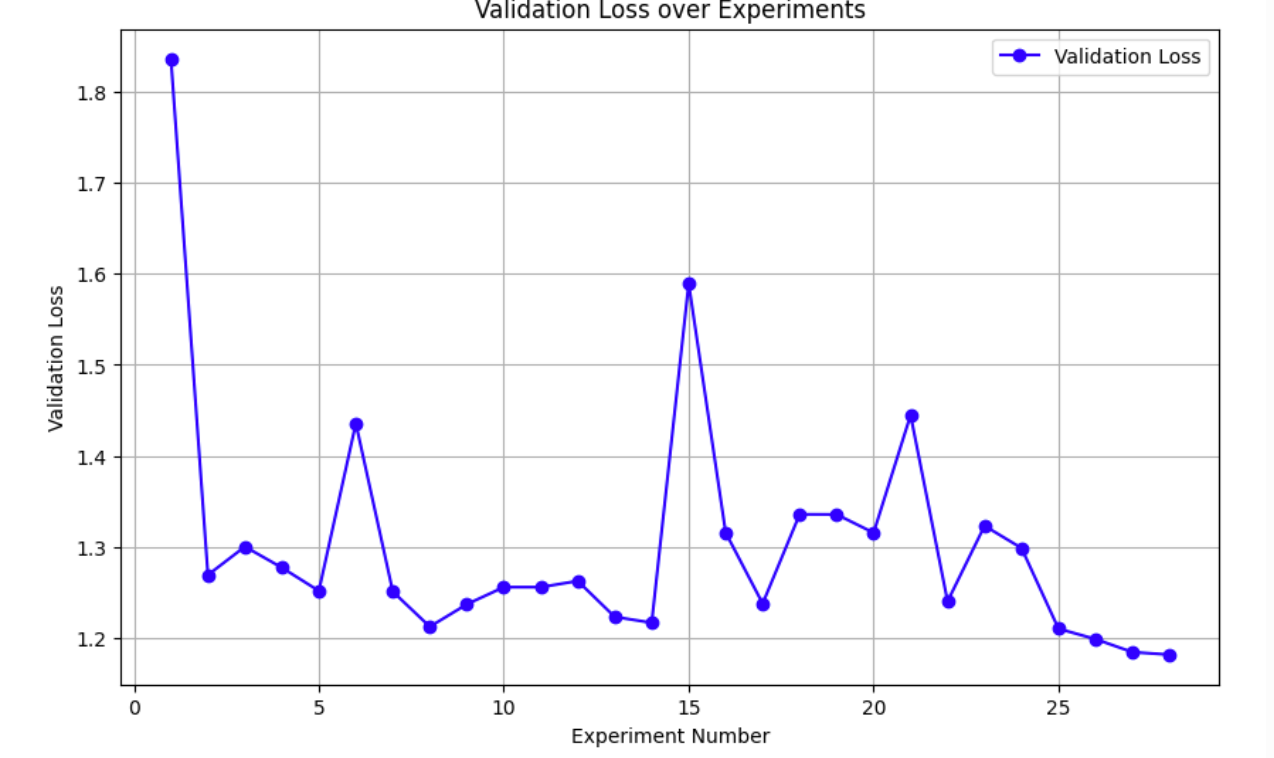
Here is a snapshot of the tsv file:
commit loss memory_gb status description 8789f42 1.836339 6.0 keep baseline e4aebb6 1.269070 3.8 keep cardinality 4 width 32, label smoothing 0.0, max_lr 1.5e-2 f0e1136 1.300190 7.6 discard batch_size 1024, max_lr 2e-2 423217b 1.277093 6.1 discard cardinality 2 width 64 41fdb79 1.251534 3.8 keep weight decay 1e-3 55423d5 1.435687 3.8 discard remove ColorJitter and RandomErasing a8d1478 1.250736 3.8 keep num_epochs 33 8433970 1.212178 5.4 keep replace ReLU with GELU aa75e9f 1.236824 5.4 discard Add Dropout p=0.1 a38743f 1.255651 5.4 discard Tune OneCycleLR pct_start 0.1 div 100 06233bd 1.255651 5.4 discard Switch GELU to SiLU
The run.log file:
loss: 1.589365 training_seconds: 193.3 total_seconds: 196.8 peak_vram_mb: 5482.5 num_steps: 2904 num_params_M: 0.5 Using device: cuda GPU Memory: 25.3 GB Files already downloaded and verified Starting Epoch 1 Batch 0/88, Loss: 4.7114 Batch 50/88, Loss: 4.2465 Epoch 1 - Training Loss: 4.3348, Validation Loss: 4.0079 Starting Epoch 2 Batch 0/88, Loss: 3.9555 Batch 50/88, Loss: 3.7705 Epoch 2 - Training Loss: 3.8064, Validation Loss: 3.6797 Starting Epoch 3 Batch 0/88, Loss: 3.5122 Batch 50/88, Loss: 3.4208 Epoch 3 - Training Loss: 3.4044, Validation Loss: 3.4134 Starting Epoch 4 Batch 0/88, Loss: 3.1425 Batch 50/88, Loss: 3.1418 Epoch 4 - Training Loss: 3.0934, Validation Loss: 2.9951 …
Multiple Agents Experiment:
I also tried running multiple agents in parallel to see if I could speed up the process. This time, I used the EfficientNet architecture which is a convolutional neural network developed by Google, and I used the CIFAR-100 dataset like before.
Setup:
The setup that I used was almost the exact same as before. The one main difference was that I introduced a new file called swarm_brain.json. This file was used to keep track of the status of each agent, and it was updated by each agent when they started and finished their trials.
The main idea here is that the json file would act as a centralized point for all worker agents, since Antigravity IDE only allows agents to run in parallel and inter-agent communcation is right now not possible.
I also made it clear in the README.md file that the agents should run in parallel as worker agents. Each worker agent would have its own unique identifier, and when they are done with a trial, they would update the swarm_brain.json file with their results and status.
Otherwise, I kept the hardware setup the same as the single agent experiment.
Running Trials:
I entered the prompt in README.md into Antigravity’s AI chat and waited. Quite immediately, my plan to spin up 3 worker agents backfired as the CUDA on my RTX 4090 GPU was maxed out. I immediately changed it back to 2 worker agents, which solved the problem. After a while, the trial runs finished without any issues or interventions.
Findings:
Here were my results from the experiment:
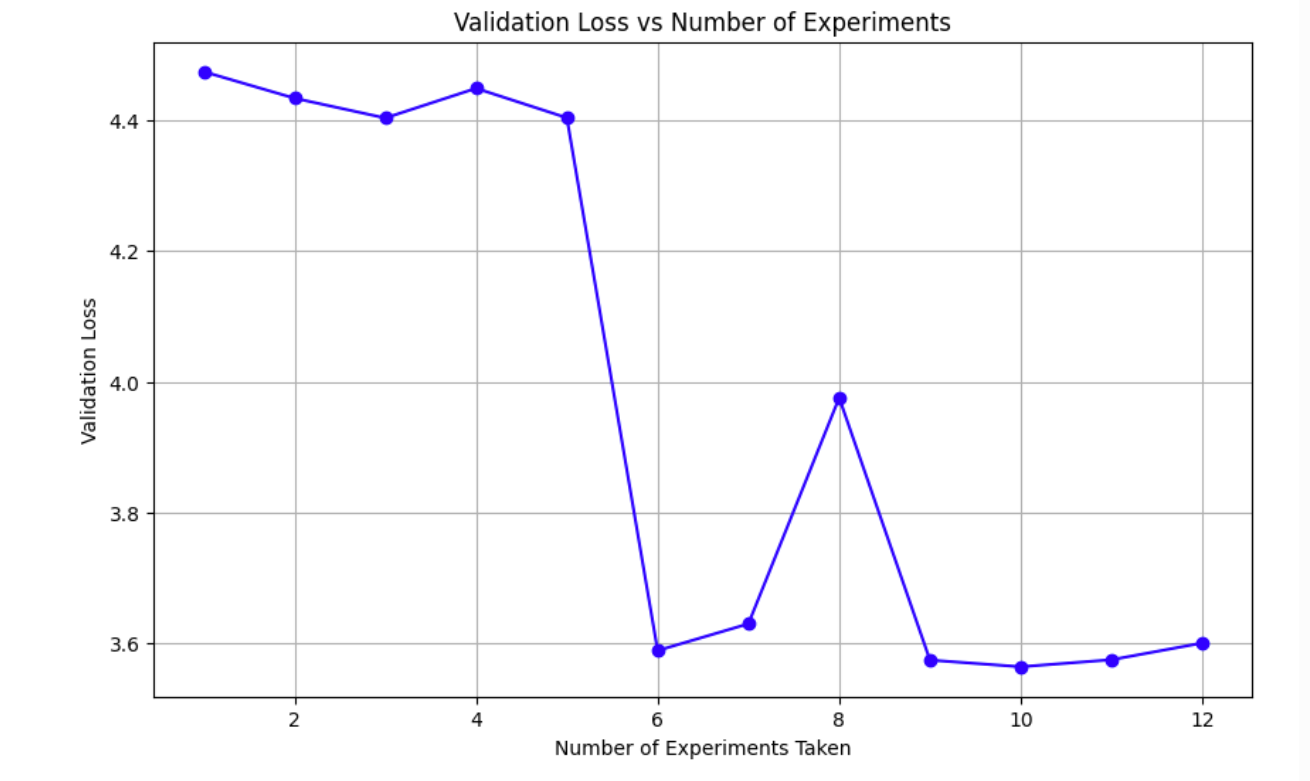
And the swarm_brain.json file:
{"agent_id": "orchestrator", "validation_loss": null, "description": "Initialization"}
{"agent_id": "worker_1", "validation_loss": 4.474519, "description": "baseline with locking and timeout"}
{"agent_id": "worker_2", "validation_loss": 4.433933, "description": "dropout to 0.1 for worker 2"}
{"agent_id": "worker_1", "validation_loss": 4.403664, "description": "label_smoothing 0.0"}
{"agent_id": "worker_2", "validation_loss": 4.449075, "description": "base_lr 8e-3"}
{"agent_id": "worker_1", "validation_loss": 4.403990, "description": "weight_decay=1e-4"}
{"agent_id": "worker_2", "validation_loss": 3.588812, "description": "batch_size=512"}
{"agent_id": "worker_1", "validation_loss": 3.629776, "description": "base_lr=2e-3"}
{"agent_id": "worker_2", "validation_loss": 3.975648, "description": "label_smoothing=0.2"}
{"agent_id": "worker_1", "validation_loss": 3.574252, "description": "base_lr=1e-2"}
{"agent_id": "worker_2", "validation_loss": 3.564052, "description": "weight_decay=0.0"}
{"agent_id": "worker_1", "validation_loss": null, "description": "Running Loop 6 base_lr=1e-2 wd=0.0"}
{"agent_id": "worker_2", "validation_loss": null, "description": "Running Loop 6 base_lr=1e-3 wd=0.0"}
{"agent_id": "worker_1", "validation_loss": 3.574787, "description": "base_lr=1e-2 wd=0.0"}
{"agent_id": "worker_2", "validation_loss": 3.600373, "description": "base_lr=1e-3 wd=0.0"}
My biggest takeaway from all of this is that it is possible to coordinate multiple agents and have them write to a single file, and then take that file as context to improve itself.
But from the validation loss progression, the drop was noticeable at first but then slowly plateaued out. Even though I told the worker agents to read the json file before every loop, it’s unclear if they actually retained the information from the previous loops. I am also unsure of how I would’ve been able to tell just from their displayed chain of thoughts.
It does lead to the idea that AI is good at jumping but not climbing. It really is a kind of brute force trial and error, where it tries different combinations and is able to jump really high at times. But when you try to ask it to build off of intermediate steps that were previously generated, it has a harder time.
Issues:
I did run into several major issues when trying to run multiple agents in parallel. The first was that Git became problematic since each agent would create their own Git branches and then try to commit their results / delete their branches when they were done. Often times for reasons I can’t figure out, Git would sometimes freeze and the agent would get stuck there.
Second, the agent would create unnecessary files even when unprompted even if I told it not to do so. I think this was due to the fact that with multiple agent setups, there will inevitably be some rogue command where the agent needs to do scratch work and just decides that a simple log file is not enough.
Third, there were times when Gemini just crashed during the middle of a trial with no reason. This is more of an Antigravity IDE problem, and with my daily work, I find that certain peak hours would make it more likely for this to happen, even with the ultra enterprise plan.
Fourth: Spawning multiple worker agents on a single GPU can be tricky due to both processes having to share resources. I did encounter instances where one process unexpectedly ran out of memory and failed while the other kept going. When I tried to restart the run with two agents, Gemini would instead try to run the agents sequentially, which totally ruins the point of having multiple agents.
Fifth: For some reason, multiple agents often have a very hard time sticking to the 5 minute time limit that I set for each trial. I have no clue why. This happens even if there is no crash.
Sixth: Every worker agent needed explicit permission to access the run.log and train.py files in their respective worktrees when starting a new experiment. I don’t know why this is the case, and there is no way to bypass it.
Future Work
I did find other ways to coordinate multiple agents through open source projects, such as https://github.com/wjgoarxiv/antigravity-swarm, which adds a specific coordination layer on top of Antigravity IDE. Having something more sophisticated like this could be more useful.
I also did not use Claude Sonnet 4.6 or any other models apart from Gemini 3.1 Pro High model. It would be interesting to see if other models would perform better or worse.
One thing that I avoided was letting an agent run overnight, since I encountered quite a few issues with Gemini crashing during the middle of a trial or the agent asking for explicit permission after 20 trials or so. The validation loss of these models would definitely be lower if I had it run for many hours like this.
If I were to also pay for a more powerful GPU, that would also help with potentially the GPU memory issues that I encountered as well as allowing for more data trials to be run. I am not currently aware of what would happen if you just tell an agent to strictly use x or y amount of VRAM or system resources per say. My intuition is that it would ignore it unless you have a separate background agent or worker constantly in a loop monitoring the resources and telling the other agents to stop if utilization goes too high. But that to me seems a bit strange as well because sometimes there would be brief spikes of GPU usage that would not necessitate a crash, but would theoretically be detected as so from a numerical standpoint.
Conclusion
It is definitely possible to run research through agents, and I was shocked that this could be done quite reliably with the right guardrails. Multi agent orchestration is still a very big challenge with the problems I described above, but I’m sure that innovation in the upcoming months will make this better. I think its too early to say whether AI researchers will be replaced, but having an assistant that never gives up, doesn’t eat food, doesn’t sleep, and can just brute force combinations definitely sounds better then just a nice-to-have.
Thanks Andrej for the inspiration, and let me know of your opinions or any other feedback!
CZ