My first Nvidia DGX Spark!
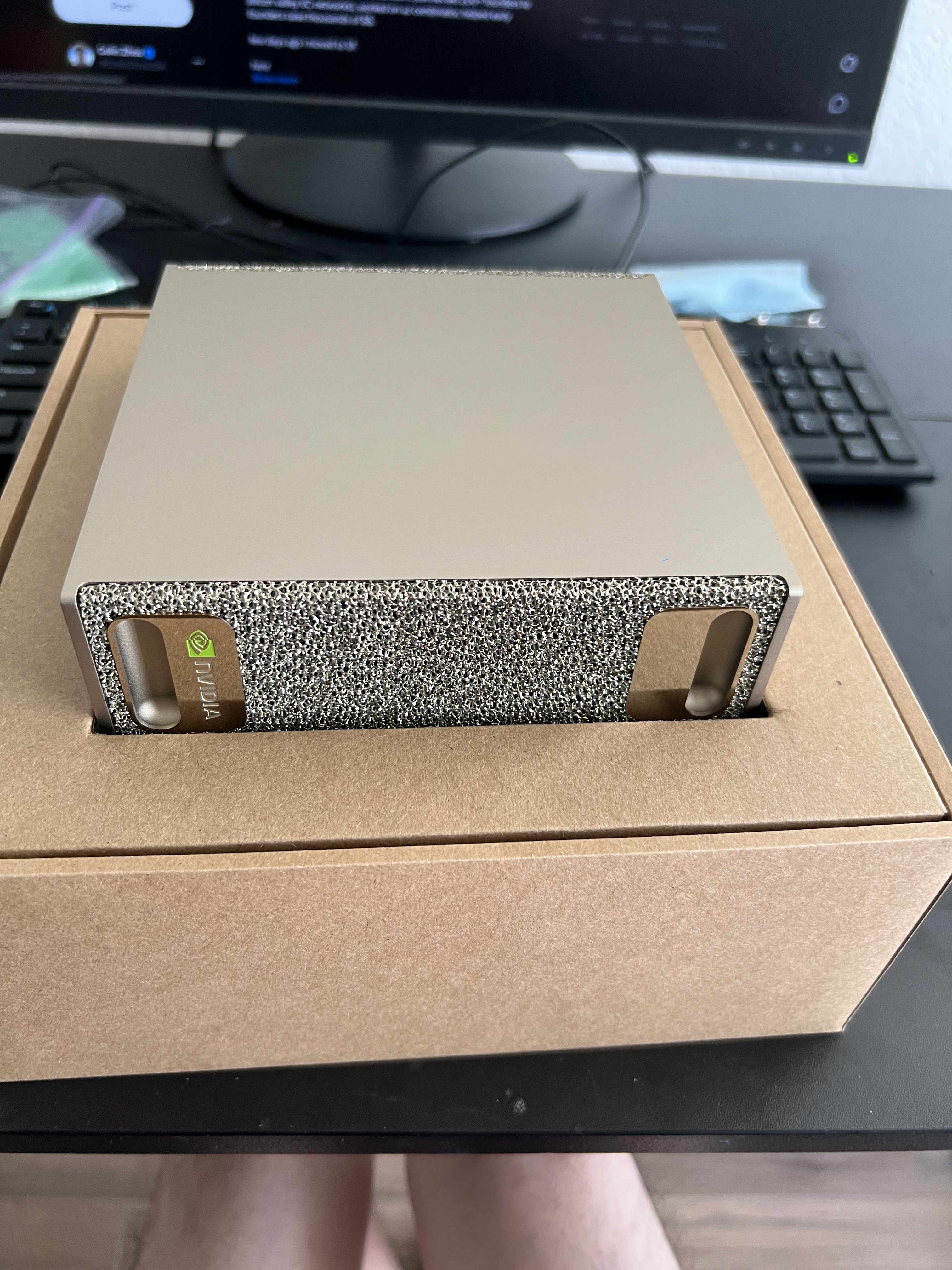
I recently got an Nvidia DGX Spark from my local Micro Center in Santa Clara. As someone who has never spent more then 1.5k on any electronics device before, I’m now the proud owner of a 5k+ device with the most powerful GPU that I’ve ever physically laid my hands on. In this post, I want to explain why I got it and my first impressions of the device after a week of use.
Preface:
My original interest in local AI models started earlier this year after I started experimenting with agentic coding and how AI models could make my work as a programmer more efficient. After seeing the staggered releases of GLM and Kimi and so many others, I realized that it was necessary for me to become compute independent.
My intuition was that AI labs are going to increase prices for their coding plans due to the pressure from investors to turn a profit. Not to mention that using the cloud for everything exposes your data and credentials to a potential highest bidder during a data breach. During the middle of April, I started developing an intense interest in understanding how machine learning systems work. I ended up spinning up some RunPod RTX GPU’s and trying to see if I could set up a dev environment to explore vLLM’s source code. But I ended up wasting about 5 total hours setting it up, since the CUDA versions on the cloud turned out not to be compatible, and also the backend took forever to compile. It was honestly incredibly dispiriting.
My original plan was to get a Mac Studio with the new M5 chip that would have amazing tok/sec and run big MOE and dense models. Unfortunately, Apple announced that prices would go up across their desktop lineup and others as well. Combined with the uncertain release date of the M5 device and the worldwide memory shortage, I decided to take drastic action. I did a week’s research on the DGX and found that while it did have its slight drawbacks compared to the Mac Studio (slower decode), the CUDA support and compact form factor made it suitable for my case.
First Impressions:
The setup was very quick and simple. I had to just plug the power adapter in, connect it to wifi, and I was able to set the ssh credentials and install all repos and dependencies with no issue. I was even able to install vLLM from the build in under 10 minutes, which was incredible. Even though the DGX Spark can be used as a desktop computer similar to the Mac mini, I preferred to set it up as a remote server, so I could access it from any device on my network.
Kudos to Nvidia for the quick and painless setup. As someone who used Windows for many years, getting my PC that now runs Ubuntu to work with the DGX was flawless.
Finding the Model:
I began by installing various versions of the most powerful model that could fit in my device with room to spare. Nvidia advertises the DGX as supporting massive performance on the custom NVFP4 quant. I had done research beforehand on how in the beginning, this ecosystem wasn’t fully working, which caused a lot of complaints. But when I started looking at models, I was pleasantly surprised to find a large offering of NVFP4 open source model recipes that were working. Some used vLLM direct commands while others used Docker containers.
I started with no intention of finetuning or doing manual quantization. It turned out that the best coding model was the Qwen 3.6 35B model. I tried to run it various ways, with vLLM and llma.cpp, and under different providers, like using Nvidia, RedHat, Unsloth, etc.
My goal at this stage was to find a combination that would give me the highest inference speed while not sacrificing the quality of the outputs. I finally got vLLM working with RedHat’s Qwen at around 60 tok/sec, which I was pretty happy about. Tinkering with vLLM took a while due to version mismatches and asking AI about the possible feature flags. I also did try to run dense models, but I found that the tokens/sec decode dropped a lot and made it not practical for coding sessions. If you are trying to decide which model to run, MOE models are definitely the way. The box stayed cool to the touch throughout!
Coding Setup:
After getting the model squared away, I installed Claude Code CLI and pointed the env variables and the CLI to my Qwen model running on vLLM. I was off and running! Immediately, I spun up a new project called qwen-frontend that I anticipated would be a web client like ChatGPT’s website that would allow users to talk with the qwen model.
After a few hours of coding, I discovered some interesting quirks:
-
Big tasks cannot be “oneshotted”. Unlike the frontier models, Qwen cannot get big tasks right the first time without consuming a lot of context. In this case, the model only supports up to 262k context length. If you wanted to ask it to set up a full stack application with all the dependencies, it could manage well. But big changes within a complex codebase requires more prompting.
-
You have to explicitly link the relevant context and files in the prompt itself for the model to perform better. Without that, the model burns a lot of thinking tokens and loops on understanding the codebase, which pollutes the context and memory. You don’t have to stress about making sure all the relevant files are right, but a few is needed.
-
Thinking loops and deadends are real. Often times, the model will think for a few minutes, make changes, decide that its not enough or that it’s wrong, and then repeat the thinking process. I had one timem when it ran for 20 minutes straight, before ending the request response. The best way to avoid this is for you to plan ahead with the model and give it a checklist of sorts.
-
It can ask for your permission a lot when wanting to execute code in the terminal or basic Linux commands. I don’t personally think of this as a nuisance because I like to see what its trying to do, but it can be a bit annoying if you want to just let it run.
Other Projects
I’ve also tried other projects on my DGX, like running benchmarks between different models/quants and training my own version of GPT-2.
The GPT-2 training was most notable since it utilized the DGX’s full capabilities as a deep learning machine. I used multiple datasets with 10-20 million tokens and trained a model based on Andrej Karpathy’s nanoGPT for thousands of iterations. One day, I left it on for a 4.5 hour training run at 96% GPU utilization. The device performed admirably and it was the first time that I had heard the fan speed up to a noticeable level. I was impressed with how well the DGX handled the heat and maintained performance without throttling.
I am aiming to complete my benchmarking suite soon, since that will hold the most value in terms of comparing performance across model releases. In addition, I have not written any custom CUDA kernels yet, but I am also interested in seeing how the performance compares to libraries like PyTorch on intensive tasks / workloads.
One major thing to keep in mind is that if the device runs out of memory, you have to force restart it by pushing the power button, holding it for about 10-20 seconds, and then waiting another 10 sec before turning it back on. I once made a mistake of trying to do a training run when I had an existing vLLM server running occupying 85% of RAM. The device SSH connection immediately dropped and didn’t budge until I did the restart.
Other Thoughts
Overall, I’m very happy with my purchase of the Nvidia DGX Spark. It has allowed me to explore local AI models and coding in ways that I never thought possible. The device is powerful, easy to set up, and has a great ecosystem of models and tools to work with. I look forward to continuing to experiment and learn with this amazing piece of hardware.
Right now, the limiting factor is the fact that running over 100b parameter models is difficult due to the memory constraints of the machine. But with the impending releases of new Qwen models, I’m confident that I will be able to run even more powerful models in the near future.
CZ